Dollar Bars

Free
Free download NinjaTrader 8 Bar Type

A new bar every time a set amount of money trades, built from every trade

No machine ID No license server Same on reload Instant download Free updates Verified on NinjaTrader 8 · 5 Nov 2026
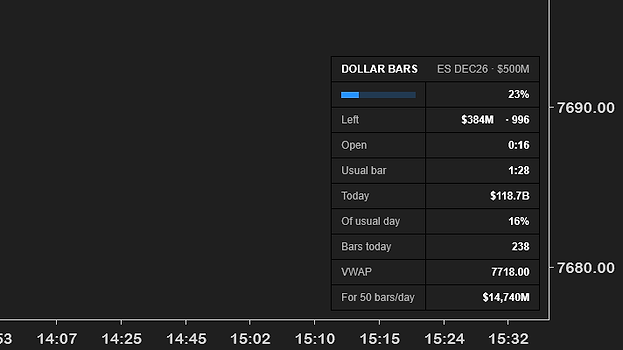
NinjaTrader 8 chart of ES DEC26 500M Dollar Bars on 5 November 2026, from 22:33 the evening before to 15:21, with the Dollar Bar Info box in the lower right reading 23% full, $384M and 996 contracts left, open 0:16, usual bar 1:28, today $118.7B, 16% of a usual day, 238 bars, VWAP 7718.00 and $14,740M for 50 bars a day
500M Dollar Bars

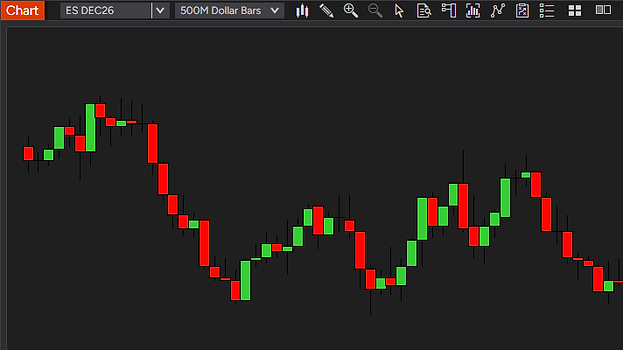
Picked in Data Series like any bar type. Every candle holds $500 million of ES, about 1,300 contracts at today’s price.

The time axis

Uneven on purpose. 04:26 to 06:54 takes the same width as 14:45 to 15:15, 2½ hours against 30 minutes.

Faster when it is busy

About 1¼ minutes a bar from 14:45 to 15:15, about 6 at night. The more money trades, the faster the bars come.

The Dollar Bar Info box

23% full, $384M left, open 0:16 against a usual 1:28. Today so far $118.7 billion in 238 bars.

A real NinjaTrader 8 chart of ES Dollar Bars, $500 million each, with the Dollar Bar Info box, 5 Nov 2026. The times on the chart are Central European.

See where the money really changes hands

NinjaTrader 8 chart of ES 500M Dollar Bars on 5 November 2026 with two equally wide stretches of 24 bars marked, 04:26 to 06:54 in grey, tagged $12 billion in 2 1/2 hours, and 14:45 to 15:15 in amber, tagged $12 billion in 30 minutes

Grey, $12 billion in 2½ hours. Amber, $12 billion in 30 minutes. The same width on the chart.

Combine Dollar Bars with your favorite tools for added context

Four NinjaTrader 8 charts on 500M Dollar Bars, 2 to 5 November 2026. NQ with two moving-average zones, YM with VWAP and its bands, ES with a TPO profile and its numbers, CL with Buy and Sell marks and a stop line

Measured in money, not in contracts.

The bars Volume bars Dollar Bars
Built from every trade each trade counted as it comes in, nothing taken from minute bars✓✓
A finished bar never changes every open, high, low and close is a price that traded✓✓
Big trades split across bars a trade larger than the room left fills the bar; the rest goes on at the same price✓✓
Strategies, the Strategy Analyzer and Tick Replay bars built by the same rules in a backtest as on the chart✓✓
One amount of money per bar
A bar holds a set amount of money $500 million by default, any whole number of millions✓
The same size across years with Merge non back adjusted, a bar in 2019 and one in 2026 hold the same money✓
The same unit of money on every market in each contract’s own currency✓
A guard against bad prints after a session’s first trade, one wrong print near zero cannot make a bar that never fills✓
Reads the bar for you
How full the bar is the percent left; on Dollar Bars also the money and contracts✓✓
How long it has been open against how long a bar usually takes✓
The day’s money and VWAP today against a usual session, and the bars so far✓
The size for your market the amount that gives about 50 bars a day✓
Yours to set
A time limit per bar quiet hours still print bars; off by default✓
Bars colored by speed fast bars highlighted, slow bars dimmed✓
Three alerts on every bar close, on a fast bar, and when the market goes quiet✓
Free, with free updates no trial, no locked settings, no license key✓✓
Works on
Markets
Futuresall exchanges
Microssame money, more contracts
Currencythe contract’s own
Data providerany with tick data
Works in
Chartslive and on reload
Strategy Analyzerbacktests, optimization
Market Replaysame rules as live
Tick Replaysupported
Needs
NinjaTrader 8recent version, free included
Datatick data, every trade
Licensenone, nothing to activate
Machine IDnone

All Dollar Bars needs is NinjaTrader 8 and tick data.

Built from every trade, like NinjaTrader’s own tick and volume bars, so how far back a chart reaches depends on the tick history your data provider gives. A new Dollar Bars chart loads 3 days by default.

Get Dollar Bars on your chart

You might ask: why is this free, what is the catch? There is none. We want to change the market for third-party NinjaTrader tools, and giving our work away is part of how we do it.

To say it plainly: this market is overpriced and full of low-quality tools with missing features and bugs. Vendors charge hundreds of dollars for simple indicators. No indicator, add-on or tool will make you profitable. A good one makes your trading environment better, and you know that already, or you would not be here looking.

Our goal is the highest-quality products we can build, tools that make a real difference on the chart. We get there by testing hard: weeks on live charts before release, feedback from the traders who use them, and a close read of what the forums complain about. We offer a full refund within 14 days, we adapt tools for customers who ask, and we give most of our work away.

Most of our tools are free for a reason. We want you to try them, see the quality and the features for yourself, and not spend a dollar with us until you think a tool deserves it. We are a business and we intend to make money, by solving real problems for traders.

So yes, Dollar Bars is completely free, no strings attached. If you like it, there are more free tools and paid ones priced well under what is usual in this market. If you have any questions, please email us at support@usefulindicators.com.

Free download

$0/forever

No card, no license key, no expiry. Nothing to cancel because nothing was started.

Download free
Included:
  • The bar type, the Dollar Bar Info box, every setting
  • Free updates
  • Support by email — answered within a day
  • Same install as the paid tools — one zip, one import
  • No license server, no machine ID

Your download is on your order page right after checkout.

How traders use it

Four ways to use bars measured in money. None of them is a signal. The bars show where the money traded, and the trade is yours.

BacktestsBars that do not drift

A volume bar of 2,000 ES contracts held about $290 million in 2019 and about $780 million in late 2026. With the merge policy set to Merge non back adjusted, a dollar bar holds the same money in both years, so a test across years compares like with like.

MarketsOne amount, every market

$500 million is $500 million on ES, NQ or CL, so a bar stands for the same amount of business on each of them.

PaceHow busy the market is

The box shows how long the forming bar has been open against the usual bar time, and alerts can tell you when bars come in bursts or the market goes quiet.

ResearchBars for your own tools

Strategies and indicators that read open, high, low, close and volume work on Dollar Bars as on any bar type.

Inside one day the price moves little, so intraday Dollar Bars look much like volume bars. The difference shows over months and years, and between markets. Studies are mixed on whether dollar bars give an edge, and we make no such claim.

Frequent questions.

Can’t find the answer to your question? Email us, we answer fast.

Download the zip, then in NinjaTrader 8 go to Tools → Import → NinjaScript Add-On, pick the file, and restart NinjaTrader once so the new bar type is in the list. Right-click a chart, open Data Series and pick Dollar Bars as the Type; the info box is DollarBarInfo, one word, in the Indicators window. It takes about a minute. The step-by-step guide covers every message NinjaTrader can show and how to update.

Genuinely free — no trial period, no locked settings, no license key, nothing to upgrade to. The download button opens a $0 checkout that asks for your name and email, no card; your download is on your order page right after that step. News emails come only if you check the optional Insider list box at checkout. We sell other tools; free tools like this one are how we show you the quality of the work first.

Bars that close when a set amount of money has traded, instead of after a set time or a set number of contracts. They are also called dollar volume bars. The idea comes from quantitative research on how to sample market data; the best-known description is in Marcos López de Prado’s book Advances in Financial Machine Learning. A bar then stands for the same amount of business whether the price is high or low. This is our own version for NinjaTrader 8, a bar type you pick in Data Series like tick or volume bars.

Not built in. NinjaTrader 8’s own bar types, among them Tick, Volume, Range, Renko, Second and Minute, count trades, contracts, price or time, and none of them is measured in money. Dollar Bars adds that bar type for free. Once it is installed you pick it in the Data Series window like the built-in ones.

Within one day they look much the same, because the price moves only a little. Over months and years, and between markets, dollar bars keep their size while volume bars drift with the price. Across contract rolls, set Tools, Options, Market data, Merge policy to Merge non back adjusted, so the bars use the prices that really traded. Research is mixed on whether either gives a trading edge; Dollar Bars is a better ruler, not a signal.

A time bar closes when the clock reaches its interval, a tick bar after a set number of trades, a volume bar after a set number of contracts, and a dollar bar after a set amount of money. Tick, volume and dollar bars all print faster when the market is busy and slower when it is quiet. A dollar bar differs from a volume bar only in its unit, so it holds the same money whatever the price. Our guide to tick charts in NinjaTrader 8 compares the bar types in a table.

There is no single right size. A common starting point is about 50 bars a day. The Dollar Bar Info box measures it for your market. Its size helper row shows the amount, in millions, that gives about 50 bars in a typical session of the days on your chart. Type that number into Data Series. On 5 November 2026 it read $14,740 million on ES and $8,448 million on NQ. A smaller amount gives more bars, a larger one fewer. An amount that suits ES gives far fewer bars on a market that trades less money in a day, so measure each market on its own.

Yes. Strategies run on Dollar Bars like on any bar type, in the Strategy Analyzer and in an optimization too, and the bars in a test are built by the same rules as the bars you see live. Fills follow NinjaTrader’s own fill rules, as with every bar type. With Tick Replay, a strategy that calculates on each tick sees the trades inside each bar. For tests across contract rolls, set the merge policy to Merge non back adjusted.

Dollar Bars has two boxes in Data Series, and the Dollar Bar Info box has 34 settings in four groups of its properties panel, covered here under six headings. The names in bold are the names you will see there.

The bar type: money per bar and a time limit

Dollar Bars is picked as the Type in Data Series (right-click the chart, then Data Series) and has two boxes there. Millions of dollars per bar sets the money one bar holds: 500 by default, any whole number from 1. Max minutes per bar (2 or more, 0 = off) closes a bar on the first trade after that many minutes, so quiet hours still print bars; the default 0, or 1, means no limit. Break at EOD works as on NinjaTrader’s own volume bars: on, each session starts a new bar.

The info box: fill gauge, money left, bar time

Show info box (on by default) puts the Dollar Bar Info box on the chart and Position sets where, bottom right by default. Fill gauge fills as the dollar bar fills, with its percent. Left in the bar shows the money and contracts left until the bar is full; with Count down off it shows what the bar has traded so far. Bar time shows how long the bar has been open, counting every second live, and how long a bar usually takes; with a time limit it reads open / limit.

The day’s money, VWAP and the size helper

Today shows the money traded this session, how much of a usual full session that is, and the bars so far. VWAP is the session’s volume-weighted average price, worked out from the bars, within about a tick of a trade-by-trade VWAP. Size helper shows the amount in millions that gives about Size helper: bars per day you want bars in a typical session, 50 by default; type it into Data Series. It counts bars by money only and needs a full session on the chart to measure.

Bars colored by speed

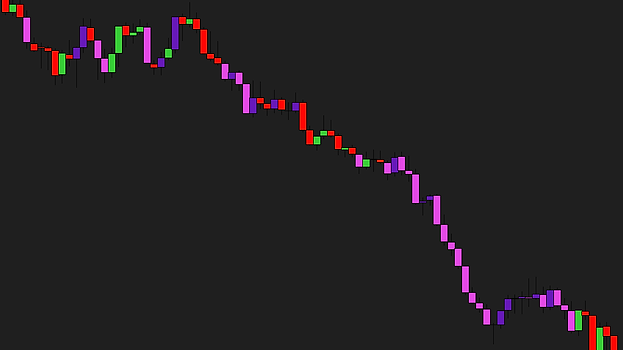
Color bars by speed (off by default) colors each finished bar by how fast it closed against the usual time; judging starts after 10 bars. Highlight fast bars paints fast bars in Fast up bar color (gold) and Fast down bar color (orange-red). Fast bar (% of usual time), 50 by default, and Slow bar (% of usual time), 200, set what counts as fast and slow; Normal bar strength (%), 100, and Slow bar strength (%), 35, set how strong their colors are.

Alerts on bar close, fast bars and quiet markets

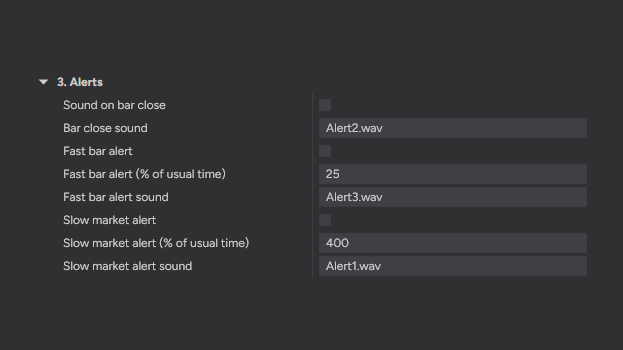
All three are off by default and sound live only. Sound on bar close plays Bar close sound (Alert2.wav) every time a dollar bar closes, at most once a second. Fast bar alert adds a line to NinjaTrader’s Alerts Log and plays a sound when a bar closes in Fast bar alert (% of usual time) or less, 25 by default, at most once every 10 seconds. Slow market alert fires once per bar when the forming bar has been open Slow market alert (% of usual time), 400 by default. A sound is a file from NinjaTrader’s sounds folder or a full path to a .wav file.

The box’s look

Font sets the box’s font and size, 6 to 72, Arial 12 by default; the numbers are drawn a step bolder. Value color, Label color, Gauge color, Label background, Value background and Grid color set its colors, and Background opacity (%), 90 by default, how solid the backgrounds are. The box keeps its size while the numbers change, so it never jumps on the chart.

No. A finished bar never changes, and every open, high, low and close is a price that traded. Reloading the chart gives the same bars as live. We recorded bars live on ES, NQ and CL, reloaded and compared them bar by bar, and an independent review rebuilt 4,605 of our recorded bars from the raw trades with a separately written program, every one the same. The one exception is the data itself. Where your provider’s history holds a trade the live feed missed, or the other way round, a reload follows the history. The bar forming now grows until it is full, like any bar.

A trade larger than the room left fills the bar, and the rest goes on in new bars at the same price, the way NinjaTrader’s own volume bars do it. With Break at EOD on, each session starts a new bar, so every day stands on its own.

Max minutes per bar, the second box in Data Series, starts a new bar with the first trade that comes that many minutes or more after the bar’s own first trade, so quiet hours still print bars. Set 2 or more to use it; 0, the default, or 1 means no limit. Without a trade the bar stays open, a bar never closes on its own clock.

From the top, the instrument and the amount per bar; a fill gauge with the percent; the money and contracts left in the bar; how long it has been open and how long a bar usually takes; the money traded today against a usual session, and the bars so far; the session’s VWAP; and the size helper, the amount for about 50 bars a day. Every row below the title can be switched off, and the box keeps its size while the numbers change, so it never jumps on the chart.

Yes, three alerts, all off by default and live only. A sound every time a bar closes, an alert when a bar closes much faster than usual (a burst of trading), and one when the bar forming now has been open far longer than usual (the market has gone quiet). The last two also add a line to NinjaTrader’s Alerts Log. They are in the Dollar Bar Info settings, under 3. Alerts.

Any futures market, with any data provider that gives tick data. Dollar Bars are built from each trade, like NinjaTrader’s own tick and volume bars, so how far back a chart reaches depends on your provider’s tick history. The amount is in the contract’s own currency, so on a euro or yen contract a million is a million of that currency. On the E-mini micros (MES, MNQ, MYM, M2K) a bar of the same amount holds ten times the contracts.

Yes. A strategy on a Dollar Bars chart simply runs on those bars. To add them in NinjaScript, use the bar type’s number, as in AddDataSeries((BarsPeriodType)732001, 500) gives $500 million bars of the chart’s instrument, with no time limit. Strategies and indicators that read open, high, low, close and volume read them like any other bars.

It is built the way NinjaTrader’s own volume bars are, each trade counted once as it comes in. Like a tick or volume chart, a Dollar Bars chart loads the tick history of every day it shows, so many days take longer to load than a minute chart. If your chart ever lags with it, email us: that’s a bug, not normal.

Email support, answered by the traders who built it. Bugs get fixed — this tool gets the same updates and support as our paid tools.

See bars measured in money on your own chart.

Free, no card, no license key. Download it, import it, and pick Dollar Bars in Data Series.

Not for you if you expect a bar type to be an edge by itself. Dollar Bars changes how the chart is cut into bars; what you trade on them is yours.

Pairs well with Free VWAP indicator · Free ATR trailing stop indicator (UT Bot Alerts) · Free EMA cloud indicator (EMA Color Zones)

We also offer custom builds

Can’t find the tool you need? We’ll build it.

Tell us what you want to see on the chart. You get a fixed price and a written plan before any work starts.

Request a free quote

Every tool on this site started as an idea like yours.

A key levels indicator we built, on a NinjaTrader chart A moving-average zones indicator we built, on a NinjaTrader chart A VWAP indicator we built, on a NinjaTrader chart