
Version list
The newest version of every tool we offer and what changed. Click a tool for the details and its version history. Every update is free.
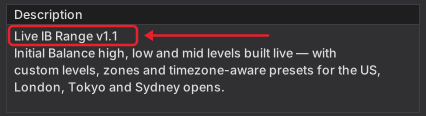
Your own version is the first line of the tool’s Description box in NinjaTrader, and for Multi Chart Layout in its settings. How to see it
25 tools
| Tool | Type | Price | Version | Released | What changed |
|---|---|---|---|---|---|
| Indicator · Paid Formerly LiveBracketsATMRiskReward_v1.5.zipTool page | Indicator | Paid | v1.5 | 31 Oct 2026 | New Changed Stop and target stay when the entry movesYour stop and target now stay at their prices when you move a pending entry by hand. It is on by default, also on charts saved with an earlier version, and you can switch it off in 01. General. |
| v1.4 | 5 Oct 2026 | Improved Name-only chart label, version in settingsThe chart label shows the tool’s name only, and the settings panel now shows the installed version with a link to the tool’s page. Calculations, settings and order handling are unchanged. | |||
| v1.3 | 26 Sep 2026 | New Fix Font choice, and stop tag fix at breakevenYou can pick the font, size and bold for the boxes and the closed-trade table. The stop tag no longer covers the entry box when the stop sits at breakeven. | |||
| v1.2 | 20 Sep 2026 | Changed Renamed to ATM Risk RewardRenamed to ATM Risk Reward. The code, the license and the chart work exactly as before. If you already own it, your license carries over by itself, and after the update you find it under its new name in the Indicators list. | |||
| v1.1 | 15 Sep 2026 | New Live dollars, points and R while you dragWhile you drag NinjaTrader’s own stop or target box in a live trade, the tag now moves with it and shows the dollars, points and R at the price under your mouse, measured from your real fill. | |||
| v1.0 | 7 Sep 2026 | Drag stop and target before the fillFirst release, with stop and target lines you can drag before the fill, all five ATM parameter types (ticks, pips, price, percent and currency) read the way NinjaTrader reads them, tags measured from your real fill after it, an entry box with the trade clock, and a closed-trade table. | |||
| Add-on · Free CandleStyler_v1.1.zipTool page | Add-on | Free | v1.1 | 5 Oct 2026 | Improved Name-only chart label, version in settingsThe chart label shows the tool’s name only, and the settings panel now shows the installed version with a link to the tool’s page. Calculations and settings are unchanged. |
| v1.0 | 29 Jun 2026 | Candle color presets in the chart toolbarFirst release, with eight preset buttons in the chart toolbar (six of ours and two of your own), body, fill, outline and wick colors per direction, coloring by trend, volume, big bars or session, and a Default button that brings the original chart back. | |||
| Add-on · Free ChartWatermark_v1.1.zipTool page | Add-on | Free | v1.1 | 5 Oct 2026 | Improved Name-only chart label, version in settingsThe chart label shows the tool’s name only, and the settings panel now shows the installed version with a link to the tool’s page. Calculations and settings are unchanged. |
| v1.0 | 24 Jun 2026 | Instrument and timeframe as a watermarkFirst release, with the instrument and timeframe as a watermark on any chart panel, eight preset looks, nine positions, 15 fonts, your own color and opacity, a drop shadow and an outline. | |||
| Indicator · Free CurrentPriceLine_v1.1.zipTool page | Indicator | Free | v1.1 | 5 Oct 2026 | Improved Name-only chart label, version in settingsThe chart label shows the tool’s name only, and the settings panel now shows the installed version with a link to the tool’s page. Calculations and settings are unchanged. |
| v1.0 | 22 Sep 2026 | Last-price line with session move and rangeFirst release, with a line that follows the last price (or another indicator’s value) with its price label, five color modes, the move since the session open and against the previous close, the session range and volume, and bid and ask lines that hide when you zoom out. | |||
| Indicator · Free DailyHLLines_v1.1.zipTool page | Indicator | Free | v1.1 | 5 Oct 2026 | Improved Name-only chart label, version in settingsThe chart label shows the tool’s name only, and the settings panel now shows the installed version with a link to the tool’s page. Calculations and settings are unchanged. |
| v1.0 | 29 Sep 2026 | Daily high, low, midpoint and close linesFirst release, with the daily high, low, midpoint and close for up to ten days, today live in its own style, today’s open, full-session levels on futures, five line modes, older days faded, labels you build from checkboxes and an info box. | |||
| Bar type · Free DollarBars_v1.0.zipTool page | Bar type | Free | v1.0 | 5 Nov 2026 | New First releaseFirst release: Dollar Bars, a new bar every time a set amount of money trades (millions per bar, an optional time limit), built from traded prices only, plus the Dollar Bar Info box with bar fill, time open, the day's money, VWAP, a size helper, bar colors by speed and alerts. |
| Indicator · Free EMAColorZones_v1.1.zipTool page | Indicator | Free | v1.1 | 5 Oct 2026 | Improved Name-only chart label, version in settingsThe chart label shows the tool’s name only, and the settings panel now shows the installed version with a link to the tool’s page. Calculations and settings are unchanged. |
| v1.0 | 25 Jun 2026 | Four moving averages with shaded zonesFirst release, with four moving averages of eight types on four price inputs, three shaded zones each with its own color and opacity, paint bars, four cross alerts with a cooldown, and a limit on how many days it draws. | |||
| Indicator · Paid FuturesNewsIndicator_v1.1.zipTool page | Indicator | Paid | v1.1 | 5 Oct 2026 | Improved Name-only chart label, version in settingsThe chart label shows the tool’s name only, and the settings panel now shows the installed version with a link to the tool’s page. Calculations and settings are unchanged. |
| v1.0 | 28 Apr 2026 | Economic calendar live on your chartFirst release, with the economic calendar live on your chart, filters by market group and impact, countdowns, PRE, RTH and AH labels, 14 time zones, optional event lines and two-stage alerts. | |||
| Indicator · Paid IntradayReferenceLevels_v1.1.zipTool page | Indicator | Paid | v1.1 | 5 Oct 2026 | Improved Changed Name-only chart label, remove v1.0 firstThe chart label shows the tool’s name only, and the settings panel now shows the installed version with a link to the tool’s page. Calculations and settings are unchanged. If you have version 1.0, remove it first with Tools › Remove NinjaScript Assembly (it is listed as IntradayReferenceLevels_v1.0), restart NinjaTrader, then import this version. |
| v1.0 | 21 Jun 2026 | Eleven daily and weekly levelsFirst release, with eleven levels (the previous day’s high, low, close, open and midpoint, today’s open, high, low and midpoint, the weekly open and the New York midnight open), each locked once it is known, labels in five formats that space themselves, and an info box. | |||
| Indicator · Free LiveIBRange_v1.1.zipTool page | Indicator | Free | v1.1 | 5 Oct 2026 | Improved Name-only chart label, version in settingsThe chart label shows the tool’s name only, and the settings panel now shows the installed version with a link to the tool’s page. Calculations and settings are unchanged. |
| v1.0 | 21 Jul 2026 | Initial Balance built live, with extensionsFirst release, with the IB high, low and mid built live over a window of 5 to 240 minutes, six session presets plus Custom, lines carried through the session, up to 30 extension levels, zones, up to ten sessions, labels, an info box and four plots for the Strategy Builder. | |||
| Indicator · Free LiveRangeLevels_v1.0.zipTool page | Indicator | Free | v1.0 | 4 Oct 2026 | Today’s high, low and midpoint, liveFirst release, with today’s high, low and midpoint live, the open and the close, level sets (quarters, thirds, eighths and Fibonacci), ten levels of your own in percent, the full day, RTH, overnight, Asia, London or your own session, and up to nine previous days. |
| Indicator · Free MonthlyHLLines_v1.1.zipTool page | Indicator | Free | v1.1 | 5 Oct 2026 | Improved Name-only chart label, version in settingsThe chart label shows the tool’s name only, and the settings panel now shows the installed version with a link to the tool’s page. Calculations and settings are unchanged. |
| v1.0 | 25 Jun 2026 | Monthly high, low and midpoint linesFirst release, with the monthly high, low and midpoint for up to 24 months, the current month’s open, four ways to extend the lines, older months faded, labels and an info box. | |||
| Add-on · Free MultiChartLayout_v1.0.zipTool page | Add-on | Free | v1.0 | 24 Oct 2026 | One-click chart layouts on any screenFirst release. One click tiles the charts on a screen into an exact layout, a grid or one main chart with others, with Undo, a saved look, layouts pinned to the chart toolbar and a strip of the screen kept free for a DOM. |
| Indicator · Paid MultiTrend_v1.2.zipTool page | Indicator | Paid | v1.2 | 18 Oct 2026 | New Timeframe buttons in the chart toolbarTimeframe buttons in the chart toolbar switch your chart with one click. They work with any bar type you have installed, from your own list of up to 20, in five styles (four follow your NinjaTrader skin, Custom uses your own colors). They show on the tabs where MultiTrend is on and are on by default. The trend strip works exactly as before. |
| v1.1 | 5 Oct 2026 | Improved Name-only chart label, version in settingsThe chart label shows the tool’s name only, and the settings panel now shows the installed version with a link to the tool’s page. Calculations and settings are unchanged. | |||
| v1.0 | 23 Jun 2026 | Up to ten timeframes in one panelFirst release, with up to ten timeframes of your choice from seconds to a year, shown as an arrow, percent, points, ticks or dollars, six panel positions, ten fonts, and calendar periods that follow the instrument’s own trading hours. | |||
| Indicator · Free ProBarCounter_v1.1.zipTool page | Indicator | Free | v1.1 | 5 Oct 2026 | Improved Name-only chart label, version in settingsThe chart label shows the tool’s name only, and the settings panel now shows the installed version with a link to the tool’s page. Calculations and settings are unchanged. |
| v1.0 | 28 Jun 2026 | Bar numbers per session with bar marksFirst release, with bar numbers per session and eight ways to reset them, new-high and new-low flags, inside and outside bar marks in four styles, five presets, a limit on how many days it draws, and an optional info box with the running counts. | |||
| Indicator · Free ProVWAP_v1.2.zipTool page | Indicator | Free | v1.2 | 9 Oct 2026 | Changed Now free, no license or trial neededProVWAP is now free. The license check is gone, so you need no license and no trial. Calculations and settings are unchanged. |
| v1.1 | 5 Oct 2026 | Improved Name-only chart label, version in settingsThe chart label shows the tool’s name only, and the settings panel now shows the installed version with a link to the tool’s page. Calculations and settings are unchanged. | |||
| v1.0 | 24 Apr 2026 | Session, weekly and monthly VWAP with bandsFirst release, with session, weekly and monthly VWAP, an anchored mode, three deviation bands in σ or percent, the previous period’s line, an RTH filter, five alert types, dynamic color and price labels. | |||
| Indicator · Free SessionColors_v1.1.zipTool page | Indicator | Free | v1.1 | 17 Oct 2026 | Fix Maintenance fix, nothing changes for youA maintenance fix in how the file is built. Nothing changes on the chart or in your settings. |
| v1.0 | 15 Oct 2026 | Trading sessions colored on your chartFirst release, with each trading session colored on your chart (Asia, Europe and the US by default), its high and low marked with a line and a label, lines where a session opens and closes, and eight presets plus Custom. | |||
| Indicator · Paid SessionLevels_v1.3.zipTool page | Indicator | Paid | v1.3 | 5 Oct 2026 | Improved Name-only chart label, version in settingsThe chart label shows the tool’s name only, and the settings panel now shows the installed version with a link to the tool’s page. Calculations and settings are unchanged. |
| v1.2 | 16 Sep 2026 | Changed NinjaTrader’s own licensing, trial starts by itselfNow licensed through NinjaTrader’s own licensing. The 14-day trial starts by itself the first time the tool loads, and a purchase is tied to your NinjaTrader account, with nothing to activate. What it draws is unchanged. | |||
| v1.1 | 12 Aug 2026 | New Second previous-close line, renamed from SessionMapA second previous-close line at its own hour (22:00 by default), with every option the first one has, and you can drag it up or down within the day. The tool was renamed SessionLevels (it was SessionMap) for the public release. | |||
| v1.0 | 20 Jul 2026 | Four session windows with their levelsFirst release, with four session windows (Asia, the European opening range, US RTH and the Initial Balance) and their open, high, low and median lines, a previous-close line, yesterday’s levels behind today’s, six time zones and a live range panel. | |||
| Indicator · Paid SMTOverlayBands_v1.0.zipTool page | Indicator | Paid | v1.0 | 30 Oct 2026 | Other markets as bands behind your candlesFirst release, with up to three other markets shown as see-through bands, lines or blocks behind your candles, each in its own range, with its real price, the distance and an info box. |
| Add-on · Free StickyNotes_v1.1.zipTool page | Add-on | Free | v1.1 | 5 Oct 2026 | Improved Name-only chart label, version in settingsThe chart label shows the tool’s name only, and the settings panel now shows the installed version with a link to the tool’s page. Calculations and settings are unchanged. |
| v1.0 | 28 Jun 2026 | Notes on your chart, tied or pinnedFirst release, with notes in ten colors from a chart-toolbar button or the right-click menu, tied to a bar and price or pinned to the screen, shrunk to an icon in one of eight shapes, moved and resized by dragging, and saved with the chart. Deleted notes can be brought back. | |||
| Indicator · Free SuperTrend_v1.1.zipTool page | Indicator | Free | v1.1 | 5 Oct 2026 | Improved Name-only chart label, version in settingsThe chart label shows the tool’s name only, and the settings panel now shows the installed version with a link to the tool’s page. Calculations and settings are unchanged. |
| v1.0 | 26 Jun 2026 | ATR SuperTrend with paint bars and alertsFirst release, with an ATR SuperTrend line styled per direction, paint bars, flip arrows, a label with the bars in the trend and the distance to the line, an optional ADX chop filter, flip alerts with sound, and plots for strategies. | |||
| Add-on · Free SystemHUD_v1.1.zipTool page | Add-on | Free | v1.1 | 5 Oct 2026 | Improved Name-only chart label, version in settingsThe chart label shows the tool’s name only, and the settings panel now shows the installed version with a link to the tool’s page. Calculations and settings are unchanged. |
| v1.0 | 24 Jul 2026 | 13 health readings in the chart headerFirst release, with 13 health readings in the chart window’s header (data feed, chart lag, last tick, order routing, ping, connection drops, NinjaTrader’s CPU and RAM and more), a warning and a critical level for each, three label modes, and a gray dash whenever a reading cannot be trusted. | |||
| Indicator · Free TickTimeRangeBarCounter_v1.1.zipTool page | Indicator | Free | v1.1 | 5 Oct 2026 | Improved Name-only chart label, version in settingsThe chart label shows the tool’s name only, and the settings panel now shows the installed version with a link to the tool’s page. Calculations and settings are unchanged. |
| v1.0 | 29 Jun 2026 | Bar countdown, ticks left and session rangeFirst release, with one panel that shows the ticks left on tick charts, a countdown to the close on minute and second charts, the ticks in the bar on other charts, the session range and the bars so far, reset per session or per calendar day. | |||
| Indicator · Free UTBotAlerts_v1.0.zipTool page | Indicator | Free | v1.0 | 9 Oct 2026 | ATR trailing stop with Buy and Sell marksFirst release, with an ATR trailing stop (the UT Bot method), Buy and Sell marks on closed bars, a label with the stop price and the distance, optional bar coloring, an optional EMA trend filter and Heikin Ashi signals, sound alerts, and five outputs for strategies and the Market Analyzer. |
| Indicator · Free WeeklyHLLines_v1.1.zipTool page | Indicator | Free | v1.1 | 5 Oct 2026 | Improved Name-only chart label, version in settingsThe chart label shows the tool’s name only, and the settings panel now shows the installed version with a link to the tool’s page. Calculations and settings are unchanged. |
| v1.0 | 26 Jun 2026 | Weekly high, low and midpoint linesFirst release, with the weekly high, low and midpoint for up to ten weeks, the current week’s open, a Sunday or Monday week start, five ways to extend the lines, older weeks faded, labels and an info box. | |||
No tool matches. Type the name as it shows in NinjaTrader’s Indicators list, or .
Which version do I have?
Right-click your chart and choose Indicators… Click the tool in the list, and the Description box starts with its name and version.
Multi Chart Layout is not in that list. In the Control Center, choose New › Multi Chart Layout…, open Settings and click More (rarely needed). Its version is on the last line.
How to update
- Download the new version from your order page, the page you landed on after your order. It always has the newest file. A free tool you can also download again from its page.
- Note the settings you changed, because the tool usually comes back with its first settings.
- Remove the old version with Tools › Remove NinjaScript Assembly… and restart NinjaTrader. It keeps the old version running until it restarts.
- Import the new file with Tools › Import › NinjaScript Add-On… and put the tool back on your chart.
Lost your order page? For a paid tool, write to support@usefulindicators.com from the email you ordered with, and we send you a fresh link within a day. Ordered before 2 November 2026? Your file is on your Creem order page, linked in the receipt email from Creem, our payment partner. More detail is in the install guide.
Questions about updates
Are updates free?
Yes. Every update is free. The new version of a paid tool works with the license you already have, for as long as it runs. With a lifetime license that is for good, with a monthly plan while you are subscribed.
How do I know a new version is out?
Every new version is added to this list on the day it comes out. Compare it with the version in the Description box in NinjaTrader, as shown above, to see whether you have the newest.
Do I have to update?
No, updating is up to you. The changes of every version are listed above, so you can see whether one matters to you.
What do the tags mean?
New is something you did not have before, such as a setting or a feature. Improved is something that already worked and now works better. Fix is something that did not work as it should and now does. Changed is something that now works differently, so read that line before you update.
Will my settings stay?
Usually not. After an update you put the tool back on your chart, and it starts with its first settings. Note or take a screenshot of the ones you changed before you update.
Why restart NinjaTrader after removing the old version?
NinjaTrader keeps a removed tool running until it restarts. If you import the new file before that, the old version keeps working and the update seems to do nothing. Close NinjaTrader and start it again, even if it does not ask you to.
I lost my order page. How do I get the new version?
A free tool you can download again from its page. For a paid tool, a trial or a monthly plan, write to support@usefulindicators.com from the email you ordered with, and we send you a fresh link within a day. An order from before 2 November 2026 is on your Creem order page, linked in the receipt email from Creem.
Can I get an older version?
We offer only the newest version for download. If a new version gives you trouble, write to support@usefulindicators.com and we help you.