
NinjaTrader 8 add-ons
Install in minutes No machine ID Free updates Support within a day
Nothing found. or ask us to build it.
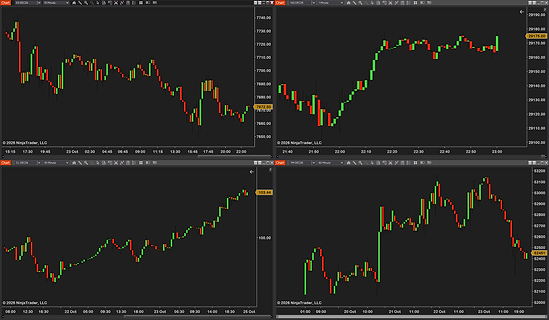
Tile your charts in one click. Grids or one big chart + others. Undo and a saved look. Room kept free for your DOM. Up to 4 pinned toolbar layouts.
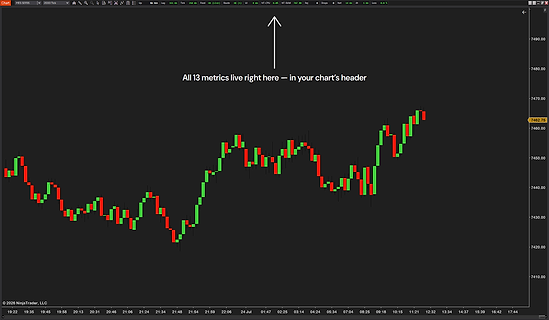
Live HUD: chart lag, data feed, order routing. 13 metrics — connection, NT8 CPU/RAM, rejections. Color-graded severity — green / yellow / red at a glance. Your own warning and critical level per metric. Game-style “FPS counter” for NT8 traders.
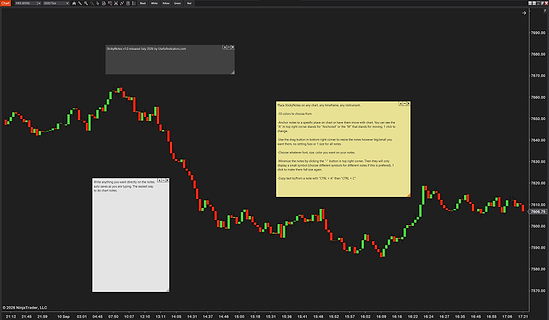
Two anchor modes — sticky to bar & price or pinned to viewport. 10 color templates + 8 minimized icon shapes. Drag to reposition, drag corner to resize. Toolbar + right-click "Add note here" — instant placement. Persists across NinjaTrader restarts.
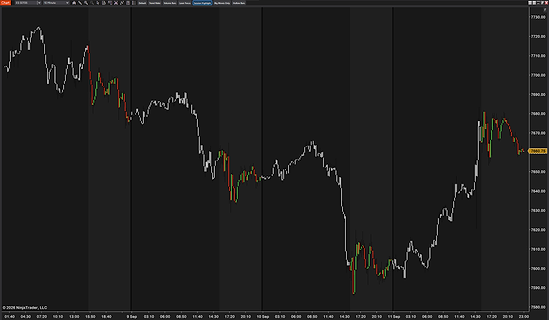
Save candle styles as presets — switch in one click. 6 built-in presets + 2 build-your-own slots. Color by MA trend, volume, session, or big moves. Solid or hollow bars, per-direction outline & wick color. Nothing changes until you click — instant, clean revert.
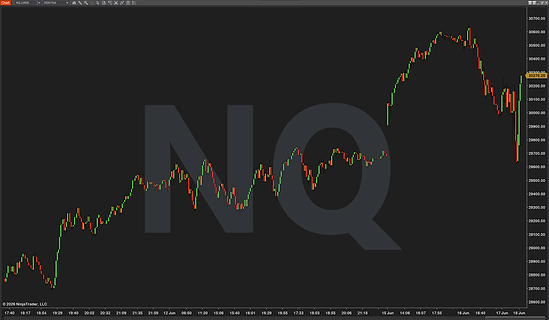
Big-text instrument watermark. Symbol, contract, timeframe, or bar type. 7 theme presets ready to use. 9 anchor positions with pixel offsets. Drop shadow, outline, 15 fonts.
Rule Enforcer
Daily loss limit you set yourself. Trades per day and time windows. Limits can’t be raised mid-day. Your exits keep working during a lock. A log of every rule that fired.
TradeTracker
Logs your chosen account’s trades by itself. Win rate, drawdown, equity curve, calendar. Add screenshots, make weekly or monthly reports.
Futures Dashboard
ES / NQ / YM / RTY correlation signals. SD-normalized beta divergence scoring. Rolling divergence windows. Real-time multi-instrument overlay. Live divergence readout on the chart.
Market Ticker
A scrolling ticker tape of futures prices inside NinjaTrader. Price and change since the last settlement. Index, energy, metals, rates, currencies or your own list.
SpeedEntry Tool
Preset stop/target configurations. Multi-account selector built in. Re-activation bug fixed vs default. Keyboard shortcut compatible. Works with Chart Trader & the DOM.
ProToolbar
Customizable button bar with quick-access trading actions. One-click flatten, reverse & cancel-all-orders. Hotkey shortcuts for every action. Drag-anywhere positioning, persists across sessions. Save and switch between multiple toolbar presets.
ProCrosshair
Custom Y-axis label — ticks, $ or % from anchor. Custom X-axis label — minutes from open, time to close. Per-axis color, thickness & dash style. Multi-chart sync across timeframes. Hotkey to mark price & lock crosshair in place.
Free NinjaTrader 8 add-ons, and how they work
NinjaTrader calls every tool you import from another vendor an add-on, and its import menu is Tools › Import › NinjaScript Add-On. On this page, add-ons are our tools that change how you work with the chart and the platform, rather than drawing price levels or signals. All five are free full versions, with no trial, no card and no license key, and they run on the free version of NinjaTrader 8 too. Looking for more? See all our free NinjaTrader 8 tools or the NinjaTrader 8 indicators list.
List updated 24 Oct 2026Free add-ons
Version · released- CandleStylerCandle colors by trend, volume, session or bar sizev1.1 ·
- ChartWatermarkThe chart’s symbol, contract or timeframe as a watermarkv1.1 ·
- Multi Chart LayoutTile your charts into an exact grid in one clickv1.0 ·
- StickyNotesColor-coded notes on a bar or pinned to the screenv1.1 ·
- SystemHUD13 live readings of your feed, connection and NinjaTraderv1.1 ·
Questions about NinjaTrader 8 add-ons
What is an add-on in NinjaTrader 8?
The word has two meanings. NinjaTrader uses it for any tool you import from another vendor, indicators and strategies included, and its import menu is called NinjaScript Add-On. In NinjaScript code, AddOn is also one kind of script, a tool that runs on its own with a window or a button instead of being added to a chart. Our Multi Chart Layout is that kind. On our site, add-ons are the tools that change how you work with the chart and the platform, and our indicators are the ones that read the market and draw on the price chart.
How do I install a NinjaTrader 8 add-on?
Download the zip and keep it zipped. In NinjaTrader’s Control Center, go to Tools › Import › NinjaScript Add-On, click OK on NinjaTrader’s warning if it shows, pick the zip in your Downloads folder, click Open, then click OK when NinjaTrader says it was imported. For Multi Chart Layout, NinjaTrader asks whether to authorize the add-on before that last OK, so click Yes. Our free add-ons need no restart.
Where do I find an add-on after installing it?
Multi Chart Layout needs nothing more, because its small four-square button is on the toolbar of every chart. CandleStyler, ChartWatermark, StickyNotes and SystemHUD go on a chart like an indicator. Right-click the chart, choose Indicators, double-click the name and click Apply, then OK. With CandleStyler on the chart, a row of preset buttons is in the chart’s toolbar. With ChartWatermark on the chart, the chart is labeled. You can pick another preset in its settings. With StickyNotes on the chart, a row of color buttons is in the chart’s toolbar. With SystemHUD on the chart, its boxes are in the chart window’s toolbar at the top, not on the chart itself.
How do I remove a NinjaTrader 8 add-on?
In the Control Center, click Tools › Remove NinjaScript Assembly, select the tool, click Remove and then OK, and restart NinjaTrader. That is how protected tools are removed, ours and most commercial ones. A free script shared as source code, as on forums, is removed in the NinjaScript Editor instead.
NinjaTrader misbehaves after I installed an add-on. What should I do?
Start NinjaTrader in safe mode to find out. Close it, hold down the Ctrl key, double-click the NinjaTrader icon and keep Ctrl held until the Control Center appears. Help › About then shows that it runs in safe mode, which starts without your workspaces and without the indicators, strategies and add-ons you imported. If the problem is gone there, a tool you imported or your workspace is the likely cause. Remove the tools you added most recently with Tools › Remove NinjaScript Assembly, restart NinjaTrader and see whether the problem stops, then tell the tool’s maker. If it is one of ours, write to us.
Do your add-ons work on the free version of NinjaTrader 8?
Yes. All five need a recent version of NinjaTrader 8, and the free version of NinjaTrader is enough. NinjaTrader 7 is not supported.
Are your add-ons free?
Yes. Five of them are out, each the full version with no trial, no card, no license key and no expiry, and every update is free. The checkout needs only your email, and your downloads open on the next page. The cards marked Notify me are tools that are not out yet, and some of them will be paid. All our free tools, indicators included, are on the free tools page.