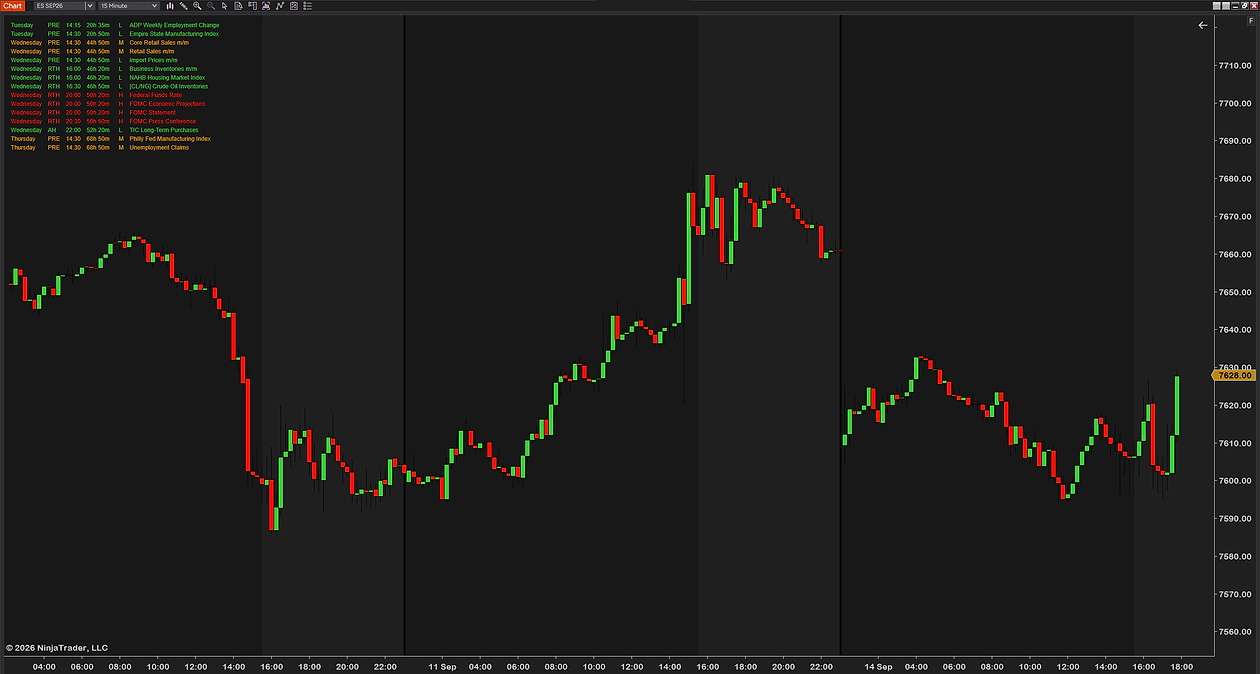
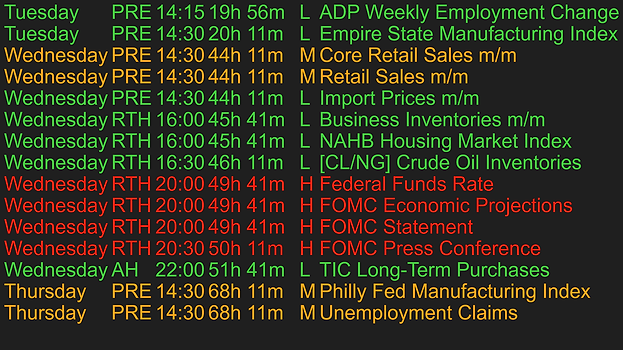
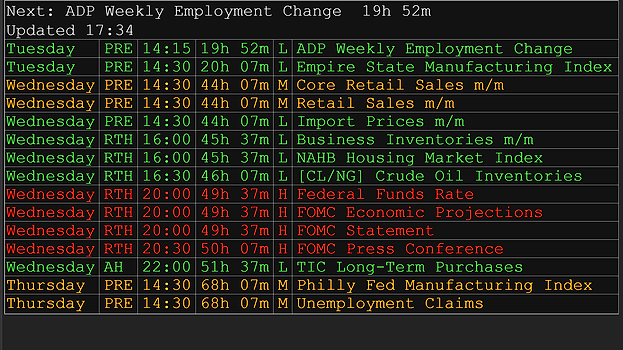
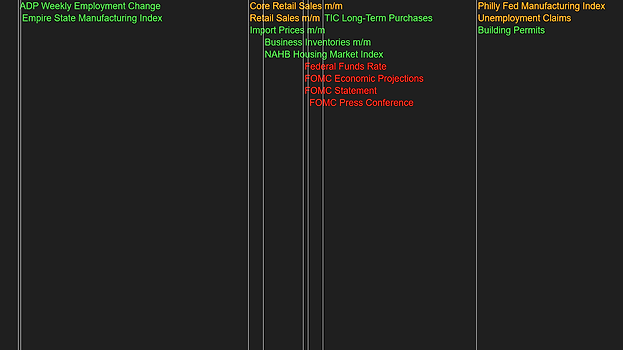
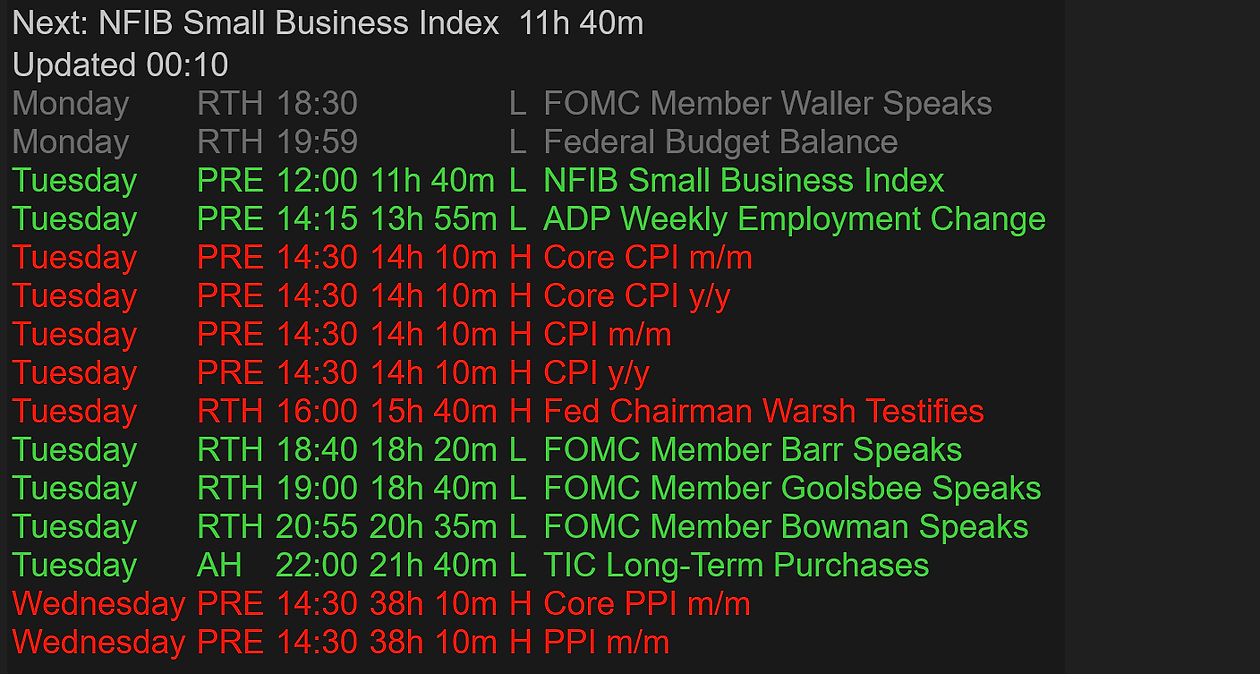
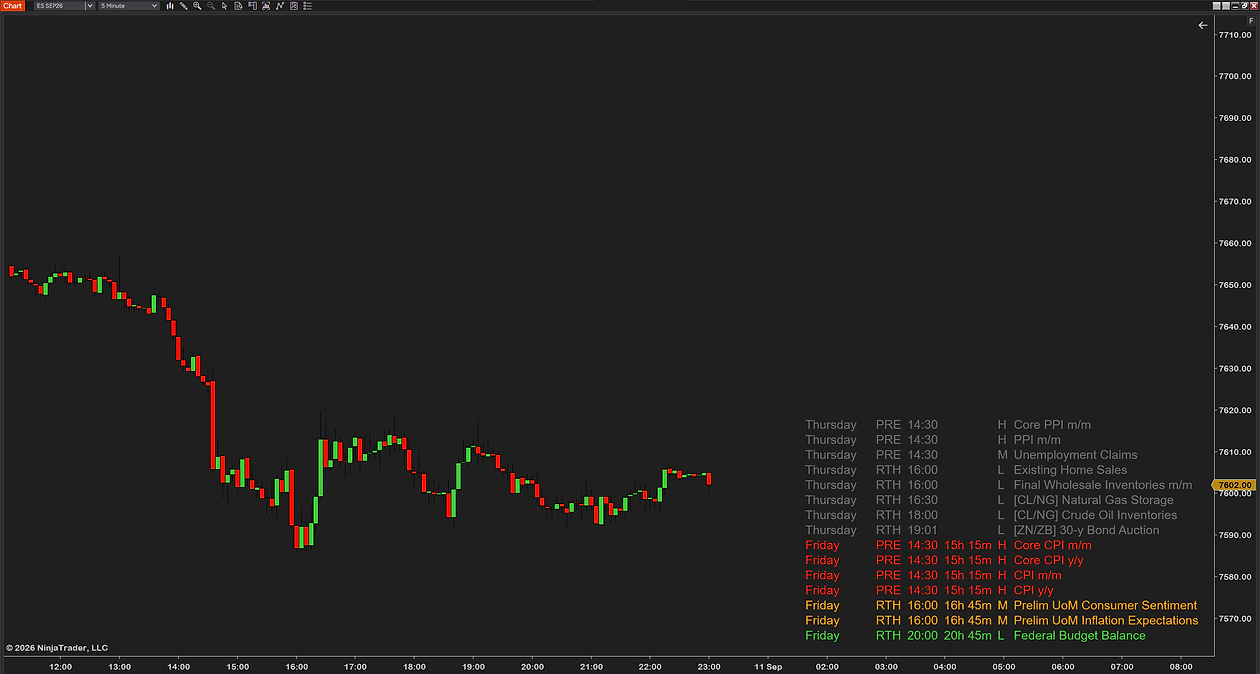
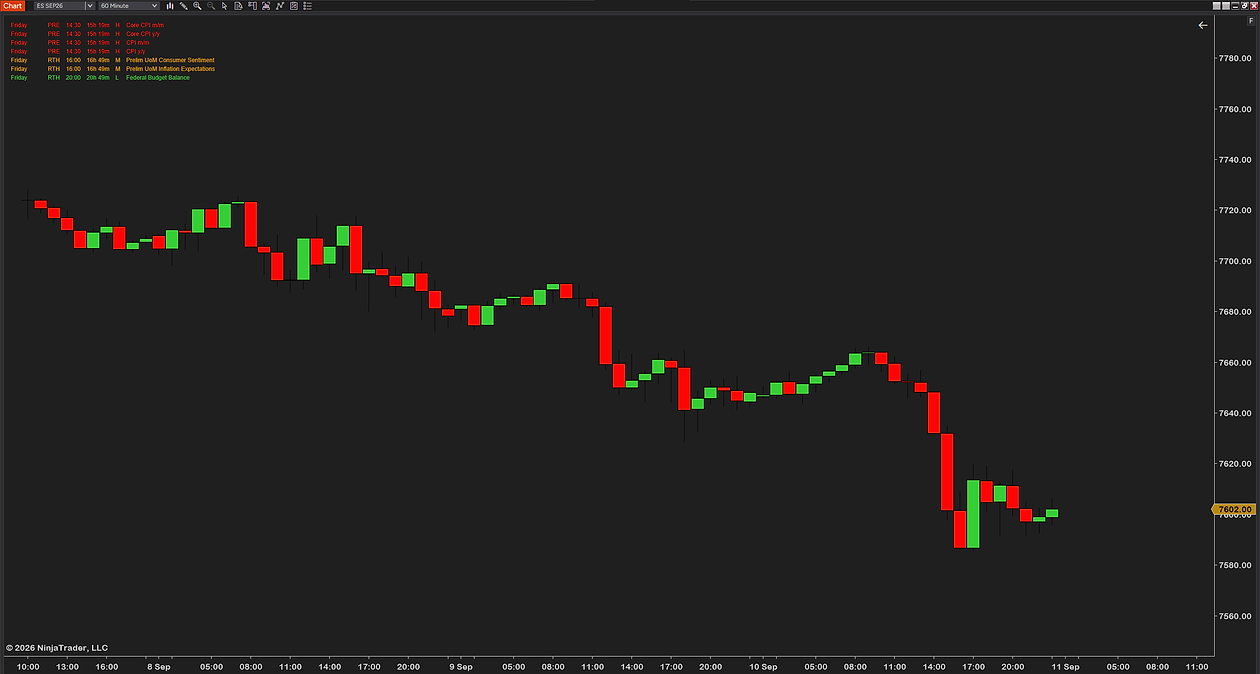
The panel — a countdown to the next release, then every event of the week: day, session, time, impact.
Live countdown to every event
Session on every row: PRE, RTH or AH
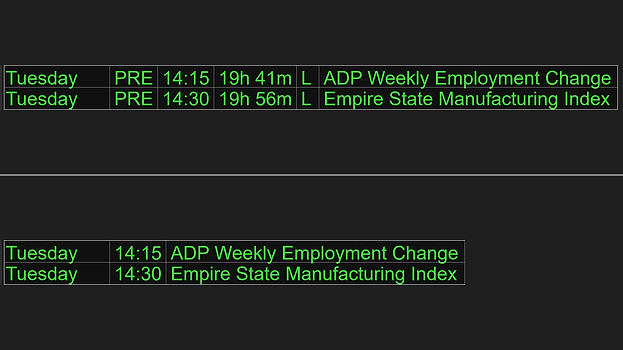
Every column on or off
Your colors, font and size
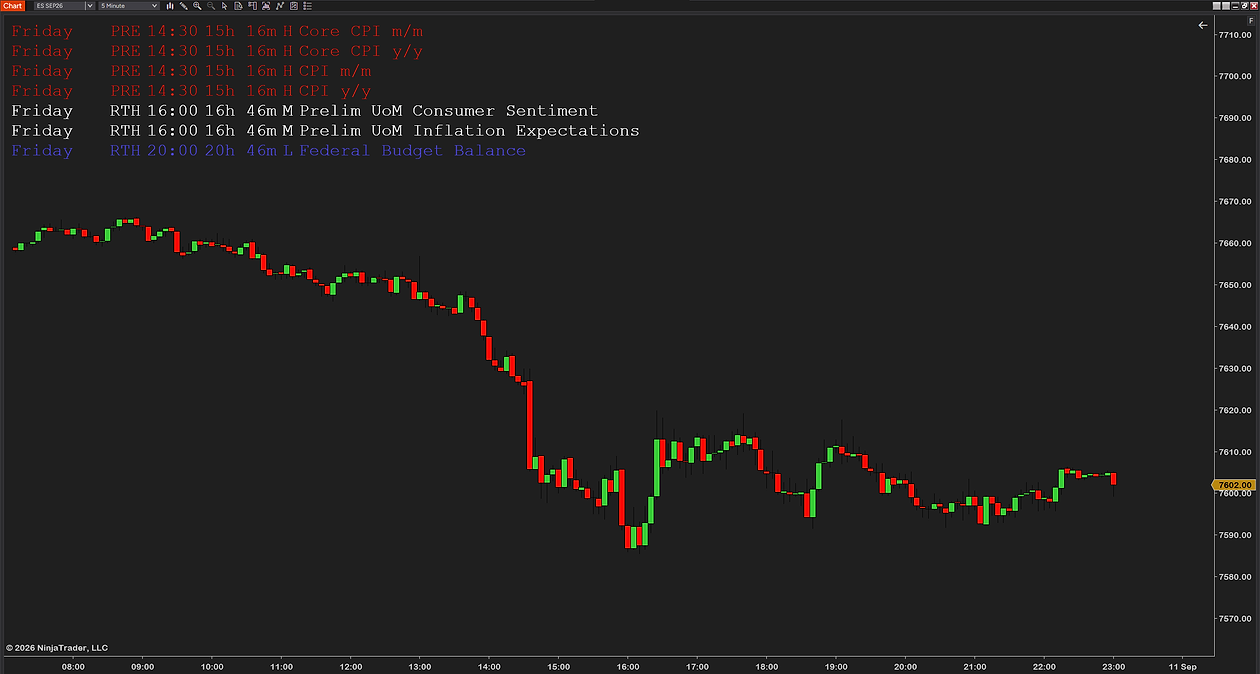
Any corner, transparent or table
Times in your zone, 12 or 24 hour
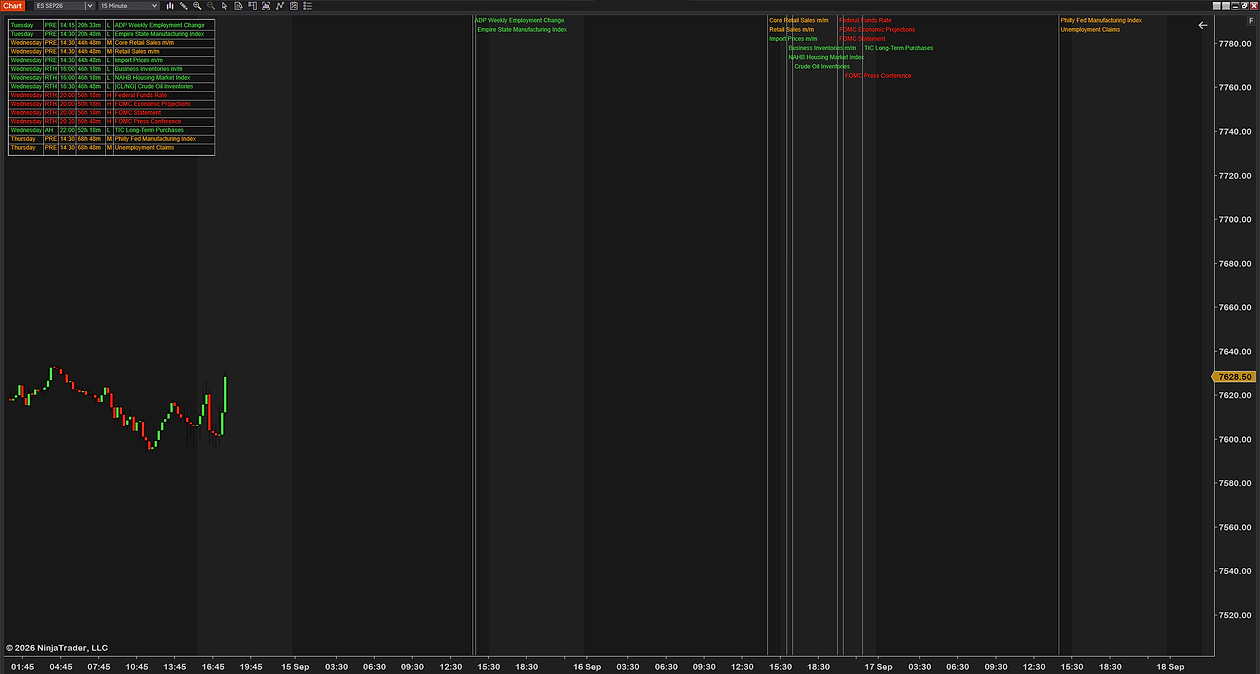
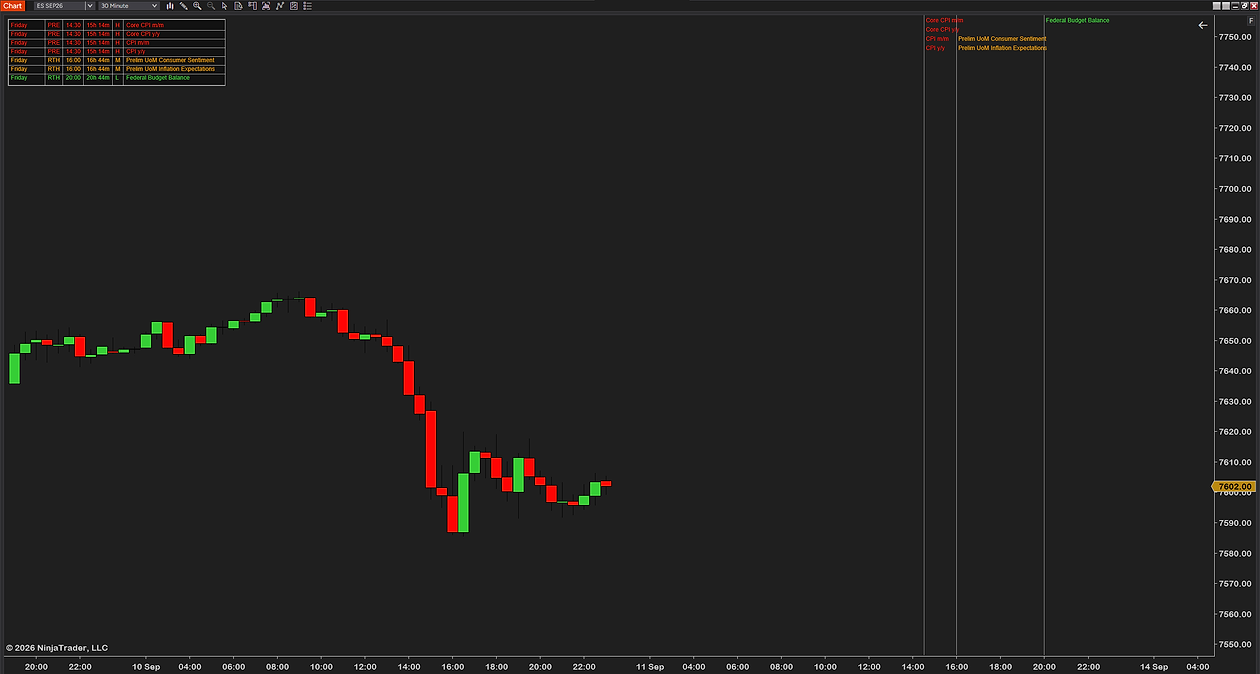
Event lines — drawn where each release lands on the chart, upcoming and already passed.
A line at every release
Colored by impact
Label at top or bottom
Past events stay, dimmed
The whole week — every scheduled release, Sunday to Saturday, before it happens.
Look ahead from 1 hour to the rest of the week
Only the markets you trade: ES/NQ/YM, CL/NG, GC/SI, ZN/ZB
High, medium or low impact, your pick
Refreshes itself, cached for offline days
The new week loads by itself on Sunday
The most advanced news indicator on the market.
The calendar
Average news tool
FNI
All news items this week every release, Sunday to Saturday
✓
✓
Impact filter high, medium and low, each on or off
✓
✓
Filtered by contract, not by country ES/NQ/YM · CL/NG · GC/SI · ZN/ZB
✓
Session on every row PRE, RTH or AH, judged in US Eastern
✓
On the chart
Vertical lines at release times labeled, colored by impact
✓
Past events stay in view dimmed, up to 48 hours back
✓
✓
The panel
A panel in any corner the events ahead, where you put it
✓
✓
Live countdown on every row and a next-event header above them
✓
Every column on or off day, session, time, countdown, impact
✓
Every color yours each impact, past events, header, background
✓
✓
Transparent or table style your font, column gap and spacing
✓
Day to day
Times in your zone 14 zones, 12 or 24 hour
✓
✓
Keeps running with the tab hidden countdowns and alerts do not pause
✓
Works when the feed is down the last calendar cached for 14 days
✓
Alerts before the release two stages, minutes of your choice
✓
✓
Works on
Chart types
Tickany count
Minuteany, daily included
Volumeany size
Rangeany size
Instruments
Futuresindex, energy, metals, rates
Stocksand ETFs
Crypto and FXany
Data providerany
Needs
NinjaTrader 88.1.5 or newer, free included
Internetfor the feed, cached offline
API keynone
Machine IDnone
In short: NinjaTrader 8 and an internet connection. That is all Futures News Indicator needs.
The calendar covers US-dollar events for the current week, Sunday to Saturday. The new week publishes on Sunday and the indicator picks it up by itself.
Every setting, group by group.
Futures News Indicator has 47 settings in seven groups of its properties panel. The names in bold are the names you will see there.
The calendar on your chart, updated by itself
The week’s US-dollar releases, Sunday to Saturday, fetched with Enable Live Fetch on and refreshed every two hours by default (Refresh Interval (Min)), the last calendar kept on disk for 14 days. Look Ahead (Hours) shows 1 to 168 hours ahead (default 48) and Max Events Shown caps the panel at 15. No account, no API key.
Countdown to the next release: FOMC, CPI, NFP
Show Next-Event Header names the next release above the panel with a live countdown, and Show Countdown Column counts down every row. Both run on the indicator’s own 60-second timer rather than on bar closes, so they keep moving on a quiet chart and when the tab is hidden.
High-impact news, filtered by your contract
Show High Impact, Show Medium Impact and Show Low Impact switch each level on or off, each in its own color. Four contract groups do the rest: ES / NQ / YM — Core Macro, CL / NG — Energy (EIA, OPEC), GC / SI — Metals and ZN / ZB — Rates (Treasury Auctions), so the panel shows only what can move your chart.
Event lines on the chart, past and upcoming
Show Vertical Lines (off by default) draws a line at every release time, labeled and colored by impact, with Line Opacity (%), Line Width (px), Show Event Label on Line and Label Position — Bottom. Show Past Events (dimmed) keeps releases in view up to 48 hours back (Past Events Lookback (Hours)).
Alerts before the release, in two stages
Enable Alerts (off by default) fires a NinjaTrader popup and sound at First Alert (Minutes Before) and again at Second Alert (Min Before), or once if the second is 0. High Impact Only limits them to the market movers. One alert per event however many charts you run, and they fire with the tab hidden.
Your time zone, your session, your panel
Display Timezone prints every time in your PC clock or one of 13 named zones, Use 24H Time Format as you prefer; Show Session (PRE / RTH / AH) is judged in US Eastern because it describes the CME session. Panel Corner, offsets, Font, Column Spacing from Compact to Wide, and Panel Style transparent or as a table.
Colored by impact. H/M/L
Use any color, and switch high, medium or low impact on or off.
Choose how much info you want to see
Day, session, time, countdown, impact and past events: each column on or off.
Use any font, table, spacing for the visuals
Transparent or table style, your font, column gap and spacing, in any corner.
Vertical lines for previous and upcoming news
Every release marked where it lands, classified high, medium or low.
Get Futures News Indicator on your chart
All plans give you instant access to Futures News Indicator, ready to use right away. No machine ID required.
14-day free trial
$0/14 days
Ends by itself. Nothing to cancel, nothing charged.
Four ways to trade around the calendar. None of them predicts the number; the entries, the stops and the discipline are still yours.
Before the releaseThe pre-release flatten
The first alert fires minutes before the number. Flatten, cut size or tighten stops on your terms, instead of watching a spike do it for you.
Stand asideThe no-trade window
High-impact release in ten minutes? No fresh entries. The countdown keeps you out of the window where spreads widen and stops get run.
After the releaseTrading the reaction
The vertical line marks exactly where the release hit the chart. Let the first spike burn off, then trade the reaction with the event bar clearly marked.
PlanningThe session plan
One glance at the panel at the open shows the whole day: when the volatility windows land and when it is usually quiet in between.
Free trial on every paid product. Full refund within 14 days. Custom changes on request. Very few NinjaTrader 8 vendors offer all three. We do it for one reason: you should never have to pay to find out whether a tool works on your chart. Most of our tools are free. The paid ones are extensively tested, kept up to date and priced well below the usual rate. We would rather earn a customer who comes back than make a sale that does not last. Questions? Email [email protected]. We answer fast.
260+Traders(all products)
700+Downloads(all products)
Verified traders running UsefulIndicators tools
Frequent questions.
Question or idea for improvement? Email us, we reply fast.
Download the zip after checkout, then in NinjaTrader 8 go to Tools → Import → NinjaScript Add-On and pick the file. Add Futures News Indicator to any chart from the Indicators list and the panel fills within a few seconds — most traders are done in under a minute. The step-by-step guide covers every message NinjaTrader can show and the update rule.
From ForexFactory’s free public calendar feed — no API key, no account, no subscription. The indicator fetches it every two hours by default and keeps a copy on disk, so a dropped connection or a weekend without internet still shows the last calendar it saw.
The feed covers the current week, Sunday to Saturday, and the new week publishes on Sunday. After Friday’s last release there is nothing upcoming until then; the indicator picks the new week up by itself.
Yes. Every event arrives as a UTC timestamp and is printed in the Display Timezone you choose — your PC clock by default, or one of 13 named zones, from US Pacific to Sydney. The PRE / RTH / AH label is always judged in US Eastern, because it describes the CME session, not your clock.
The US-dollar releases: FOMC, CPI, NFP, GDP, PMIs, retail sales, jobless claims, Fed speakers, oil and gas inventories, Treasury auctions and the rest. Each one is sorted into an instrument group — ES/NQ/YM, CL/NG, GC/SI or ZN/ZB — and tagged high, medium or low impact. Turn off the groups and levels you do not trade and the panel shows only what can move your chart.
No, and we won’t pretend it is. It tells you when a release lands and how much it usually matters; it cannot tell you which way the number breaks — nothing can. The trade decisions stay yours.
No. Futures News Indicator never touches your orders, positions or account. It draws on the chart and can raise alerts — every order is yours to place, in your own order-entry window, exactly as before.
Yes. The countdowns and the alert check run on the indicator’s own 60-second timer, not on bar closes, so they keep working on a quiet chart and with the tab hidden. NinjaTrader plays its alert sound and shows the popup. One alert per event, however many charts you run.
It’s built lean — one shared engine does the fetching for every chart, the panel text is cached, and the live work happens once a minute rather than on every tick. If your chart ever lags with it on, email us: that’s a bug, not normal.
Not a free edition, but a free 14-day trial with every setting of the paid version — no card, nothing to cancel, it switches itself off. After that it is $29 once, yours to keep with free updates, or $2.99 a month.
Yes. Every release carries an impact level — high, medium or low, the grading traders call red folder news — shown in its own color and switchable with Show High Impact, Show Medium Impact and Show Low Impact. High Impact Only limits the alerts to the red-folder releases: FOMC, CPI, payrolls and the other market movers.
Yes. The Next-Event Header names the next release with a live countdown, and the Countdown column counts down every row in the panel. Both run on the indicator’s own 60-second timer, so they keep moving on a quiet chart and when the tab is hidden, and the alerts fire at the minutes you set before the release.
Yes — that is the feed this indicator reads: Forex Factory’s free public calendar of US-dollar events, fetched by itself every two hours and cached for 14 days, with no account and no API key. The panel lists the week’s releases with countdowns, the event lines mark them on the chart, and the high, medium and low impact grading is the calendar’s own.
Email support, answered by the traders who built it. Bugs get fixed, and updates are free.
The Nerd Vault
The feed, the time zones and the logic behind every row Futures News Indicator draws.
How it works
Feed time (UTC) → your zone
Every event arrives from the free ForexFactory calendar feed as a UTC timestamp. The panel converts it to your Display Timezone, your PC clock by default with 13 others to choose from, so in winter an 08:30 New York release reads 14:30 in Oslo and 22:30 in Tokyo. The feed is fetched every 120 minutes and cached on disk, so a dropped connection shows the last calendar, not an empty panel.
Session = PRE · RTH · AH judged in US Eastern
The session label is decided in US Eastern whatever zone your chart runs in: before 09:30 ET is PRE, 09:30 to 16:00 ET is RTH, after 16:00 is AH. It tells you at a glance whether a release lands inside the cash session, where the reaction in the index futures is usually largest.
Countdown = event − now every 60 s
The countdowns and the alerts run on the indicator’s own 60-second timer, not on bar closes, so they keep counting on a quiet chart and with the chart tab in the background. Past events fall out of the list, or stay dimmed for a lookback window you set.
Hover a term to see it in the drawing and the table
HighMediumLowPastproduct default colors
Drawn with alerts and past events switched on (both off by default): refresh every 120 minutes, alerts at 10 and 3 minutes. An illustration, not market data. Colors are the indicator’s own defaults.
Worked example · five feed rows, one winter weekTimes as the panel prints them · Eastern and Oslo shown
Feed row (UTC)
Event
Impact
Group
Eastern
Oslo (CET)
Session
Countdown at 13:20 UTC
Tue 13:30
CPI m/m
H
ES / NQ / YM
08:30
14:30
PRE
10m 00s
Wed 15:30
Crude Oil Inventories
L
CL / NG
10:30
16:30
RTH
26h 10m
Wed 18:00
10-y Note Auction
L
ZN / ZB
13:00
19:00
RTH
28h 40m
Wed 19:00
FOMC Statement
H
ES / NQ / YM
14:00
20:00
RTH
29h 40m
Thu 13:30
Philly Fed Manufacturing Index
M
ES / NQ / YM
08:30
14:30
PRE
48h 10m
Only US-dollar events are kept, and each one is sorted into a group by its title: the macro releases are the ES / NQ / YM catch-all, oil and gas inventories go to CL / NG, metals reports to GC / SI, Treasury auctions to ZN / ZB. Duplicate rows the feed sometimes publishes are removed by date and title.
Where the data comes from
The free public ForexFactory calendar feed, no API key and no account. It covers the current week, Sunday to Saturday, and the new week publishes on Sunday. The indicator re-fetches every two hours by default, keeps a copy on disk for 14 days and, with the Updated line switched on, warns in the panel when the data is more than a day old.
Session labels
PRE, RTH and AH follow the CME equity index session in US Eastern, whatever your Display Timezone says. A release at 08:30 ET is PRE in Oslo and in Tokyo alike, because the label describes the market, not your clock.
Alerts
Two stages, 10 and 3 minutes before by default, both yours to set; the second can be switched off. Checked every 60 seconds, so an alert lands within a minute of its mark. One alert per event however many charts run the indicator, and they fire with the chart tab in the background. Off by default: you switch them on.
Offline and outages
If the feed is unreachable, the panel shows the last calendar it fetched and says so. An empty answer from the feed never wipes the events you already have, and failed fetches back off gradually instead of hammering the connection. The first load after install needs the internet once.
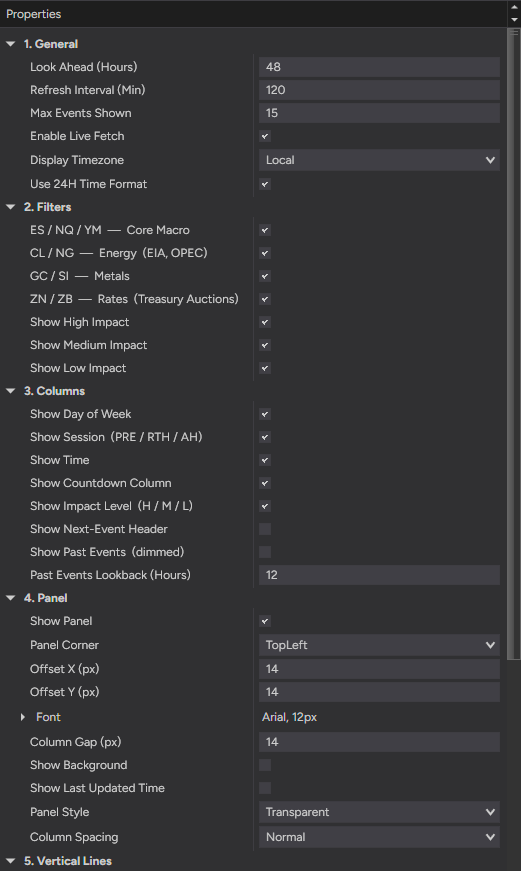
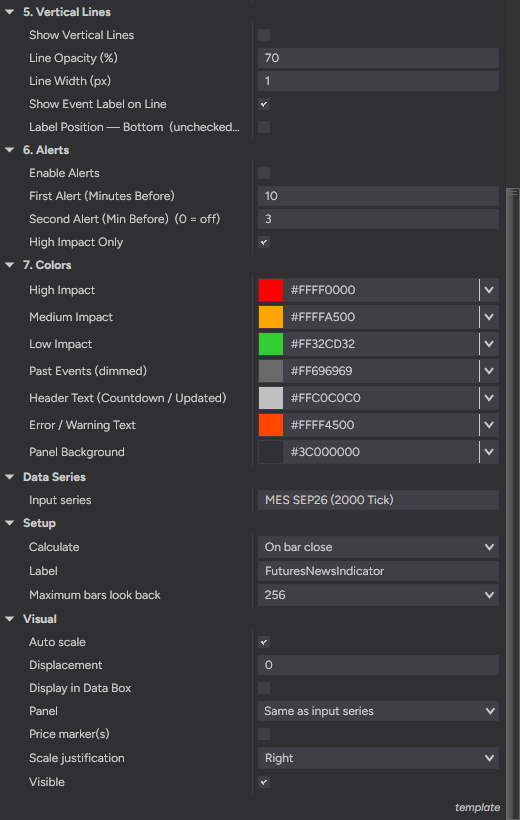
This is the actual settings panel in NinjaTrader — numbered groups, plain-English names, no cryptic abbreviations. Every row in the table below is one of these.
Setting
Default
Range
General
Look Ahead (Hours)
48
1 – 168
Refresh Interval (Min)
120
10 – 1440
Max Events Shown
15
1 – 50
Enable Live Fetch
On
On · Off
Display Timezone
Local
Local · UTC · Eastern · Central · Pacific · London · Central Europe · Moscow · East Africa · India · Singapore · Tokyo · Sydney · Brazil
Use 24H Time Format
On
On · Off
Filters
ES / NQ / YM — Core Macro
On
On · Off
CL / NG — Energy (EIA, OPEC)
On
On · Off
GC / SI — Metals
On
On · Off
ZN / ZB — Rates (Treasury Auctions)
On
On · Off
Show High Impact
On
On · Off
Show Medium Impact
On
On · Off
Show Low Impact
On
On · Off
Columns
Show Day of Week
On
On · Off
Show Session (PRE / RTH / AH)
On
On · Off
Show Time
On
On · Off
Show Countdown Column
On
On · Off
Show Impact Level (H / M / L)
On
On · Off
Show Next-Event Header
Off
On · Off
Show Past Events (dimmed)
Off
On · Off
Past Events Lookback (Hours)
12
1 – 48
Panel
Show Panel
On
On · Off
Panel Corner
Top Left
Top Left · Top Right · Bottom Left · Bottom Right
Offset X (px)
14
0 – 5000
Offset Y (px)
14
0 – 5000
Font
Arial 12
Any font
Column Gap (px)
14
0 – 40
Show Background
Off
On · Off
Show Last Updated Time
Off
On · Off
Panel Style
Transparent
Transparent · Table
Column Spacing
Normal
Compact · Normal · Spacious · Wide · Custom
Vertical Lines
Show Vertical Lines
Off
On · Off
Line Opacity (%)
70
1 – 100
Line Width (px)
1
0.5 – 4.0
Show Event Label on Line
On
On · Off
Label Position — Bottom (unchecked = Top)
Off
On · Off
Alerts
Enable Alerts
Off
On · Off
First Alert (Minutes Before)
10
1 – 60
Second Alert (Min Before) (0 = off)
3
0 – 30
High Impact Only
On
On · Off
Colors
High Impact
Red
Any color
Medium Impact
Orange
Any color
Low Impact
Lime Green
Any color
Past Events (dimmed)
Dim Gray
Any color
Header Text (Countdown / Updated)
Silver
Any color
Error / Warning Text
Orange Red
Any color
Panel Background
Black at 24%
Any color
Ranges are printed only where the indicator enforces one. Colors accept any color.
One shared engine per NinjaTrader instance does the fetching and parsing, so ten charts cost one download. The indicator calculates on bar close and does its live work on a 60-second timer, never per tick. Panel text is laid out once and cached until the font or the data changes, the network runs off the chart thread, and the feed response is capped at 5 MB. If your chart ever lags with Futures News Indicator on, that is a bug and we want to hear about it.
Panel times print in the Display Timezone you pick: Local (your PC clock), UTC, Eastern, Central, Pacific, London, Central Europe, Moscow, East Africa, India, Singapore, Tokyo, Sydney or Brazil, with daylight-saving handled by Windows’ own zone rules. Session labels stay in US Eastern. Vertical lines are placed on the chart’s own time axis, so if you pick a panel zone that differs from your chart’s zone, the panel time and the line position can read differently; the line is always where the release lands on your bars.
The file
FuturesNewsIndicator_v1.0.zip, 194 KB. A standard NinjaScript add-on: Tools → Import in NinjaTrader 8, nothing else to install. Delivered instantly on the checkout page and in your email receipt.
The license
One-time purchase, yours to keep. Tied to your NinjaTrader account email, not to a machine: install it on every computer you own.
Updates
Every update is free and installs the same way, over the top of the old one.
NinjaTrader 8.1.5 or newer, the free tier included. One license, every computer you own. One-time purchase, free updates.
Internet
Needed for the first load and for each refresh. Offline, the last fetched calendar is shown from the 14-day cache. Your firewall must allow nfs.faireconomy.media and cdn-nfs.faireconomy.media, the two hosts the ForexFactory feed is served from.
Coverage
US-dollar events from the free ForexFactory feed, the current week only. After Friday’s last release the panel is empty of upcoming events until the new week publishes on Sunday.
Chart types
Every bar type: tick, minute, volume, range and daily. Any instrument and any data provider; the calendar is platform-wide, not tied to a symbol.
Vertical lines
A line is drawn where the chart has bars at that time. An event hours ahead on a tick chart appears in the panel first and on the chart as the bars print.
Alert timing
Checked every 60 seconds, so an alert fires up to a minute after its mark. Use the second stage for the final warning.
Per-chart time zone
Each chart’s copy has its own Display Timezone. Set it once per chart, or save it in a chart template.
The only connection the indicator makes is to the ForexFactory calendar feed, to read it. Nothing about you, your account, your charts or your trades is sent anywhere, and there is no telemetry. The only other check is NinjaTrader’s own license verification of your NinjaTrader account, done by the platform, the same as for every licensed add-on. The feed file is parsed with external references disabled, and the copy on disk lives in your NinjaTrader folder.
Verification
Runs on
NinjaTrader 8.1.8.2.
Last checked
14 Sep 2026, on our own live charts. The date changes only when the indicator has actually been run on that version.
Current build
v1.0, released 28 Apr 2026. Every update is free.
Changelog
v1.0 · 28 Apr 2026
Initial release: live economic calendar on the chart, instrument-group and impact filters, countdowns, PRE/RTH/AH session labels, 14 display time zones, optional event lines with labels, two-stage alerts, Transparent or Table panel style.
See the week on your own chart before you decide.
Fourteen days, every setting, no card. It switches itself off, and if you keep it, it is $29 once and yours to keep.
Not for you if you want the number itself, or a call on which way it breaks. Futures News Indicator shows you when a release lands and how much it usually matters; the data and the reaction belong to the market.
Futures trading involves substantial risk of loss and is not suitable for every investor. Futures News Indicator is an informational and decision-support tool only — it is not a trade signal, recommendation, or financial advice. Economic calendar data is provided by a third party and may be subject to change or delay. Past performance is not indicative of future results.
NinjaTrader®, NinjaTrader.com and associated NinjaTrader marks are registered trademarks and the property of NinjaTrader Group, LLC. UsefulIndicators is listed on the NinjaTrader Ecosystem; NinjaTrader Group, LLC does not endorse or recommend any third-party product.
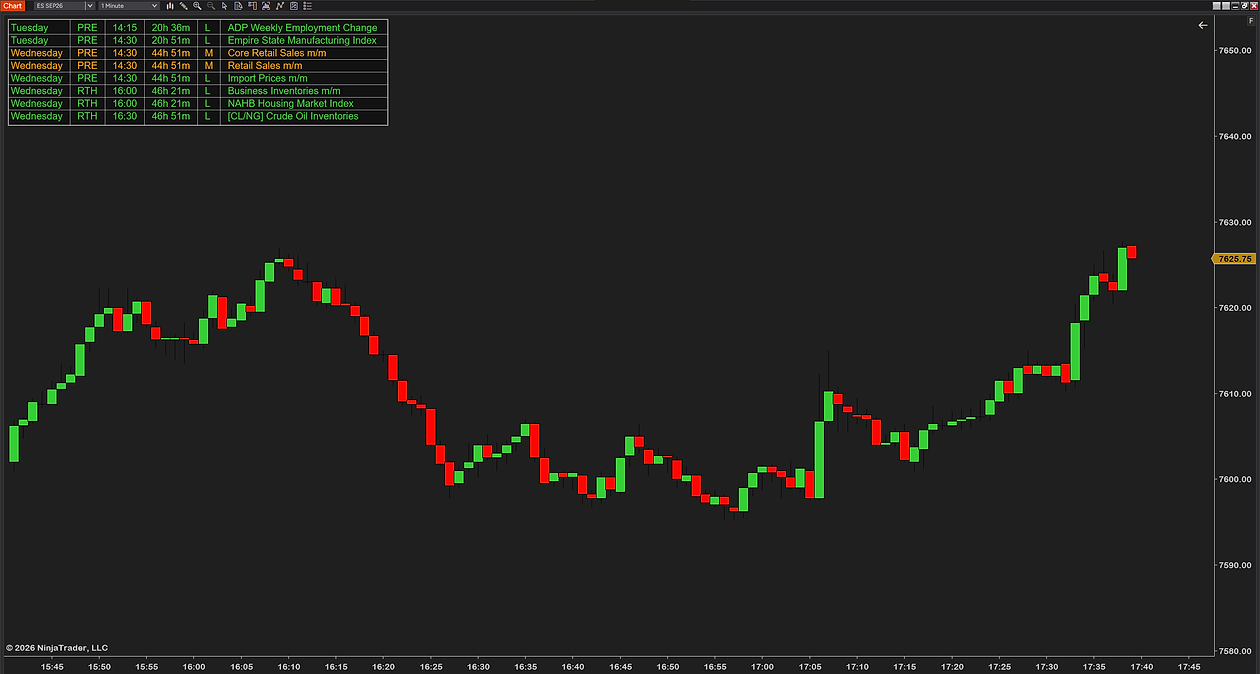
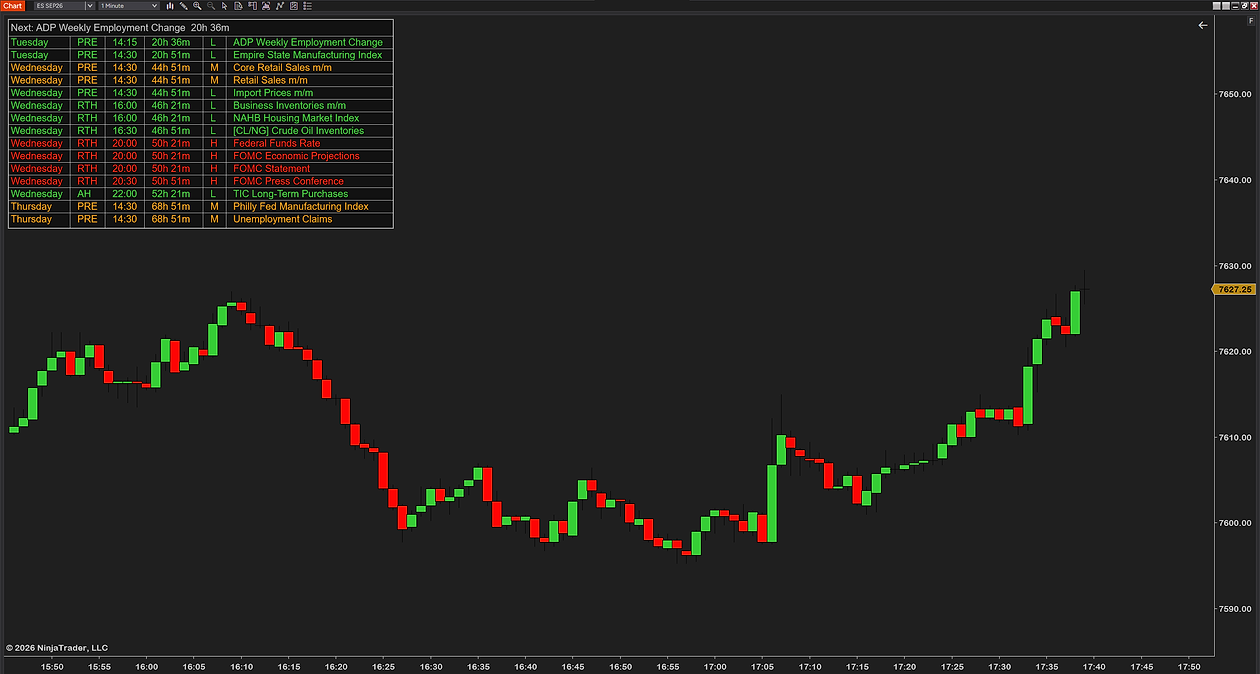
![Futures News Indicator on a 1-minute ES chart, the transparent panel in the top-left corner: Tuesday and Wednesday releases with their times, colored by impact, the crude-oil report tagged [CL/NG]](/assets/images/indicators/news/crisp/fni-5-1260.png)