ATM Risk Reward

$149 $49
Built for Chart Trader NinjaTrader 8 Add-On

Risk reward indicator for Chart Trader: your real ATM stop and target on the chart before the fill

Never places an entry No vendor license server No machine ID Instant download Free updates Verified on NinjaTrader 8.1.8.2 · 4 Sep 2026
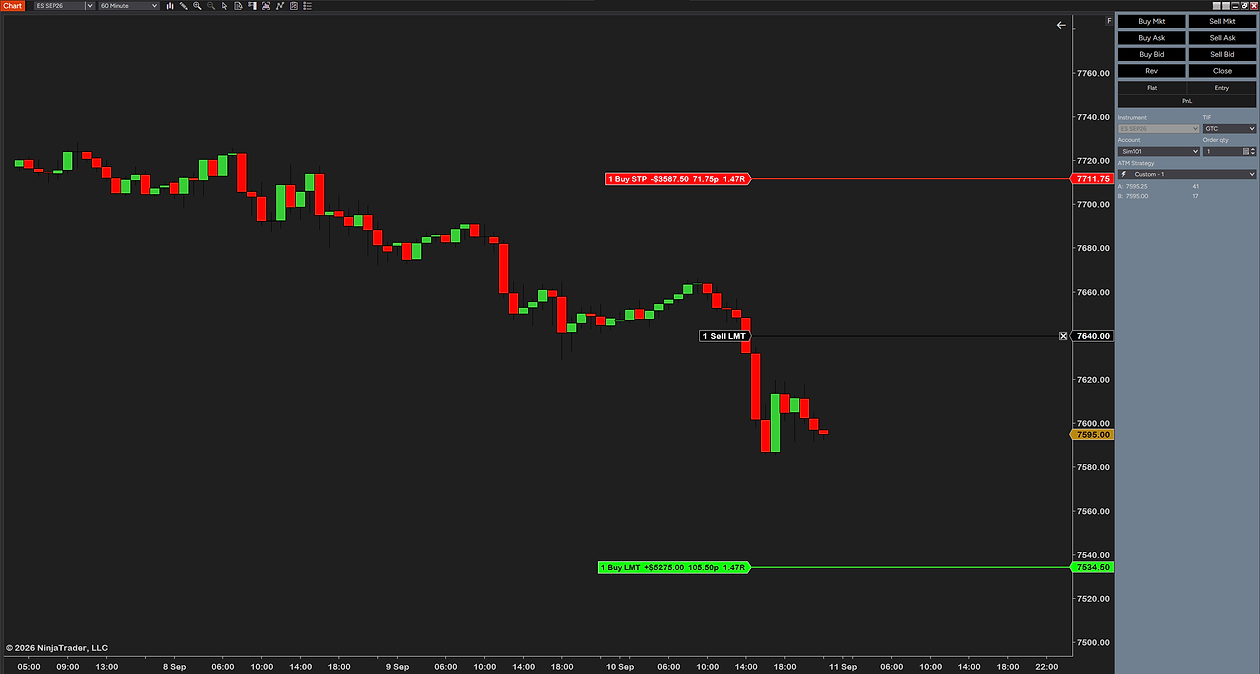
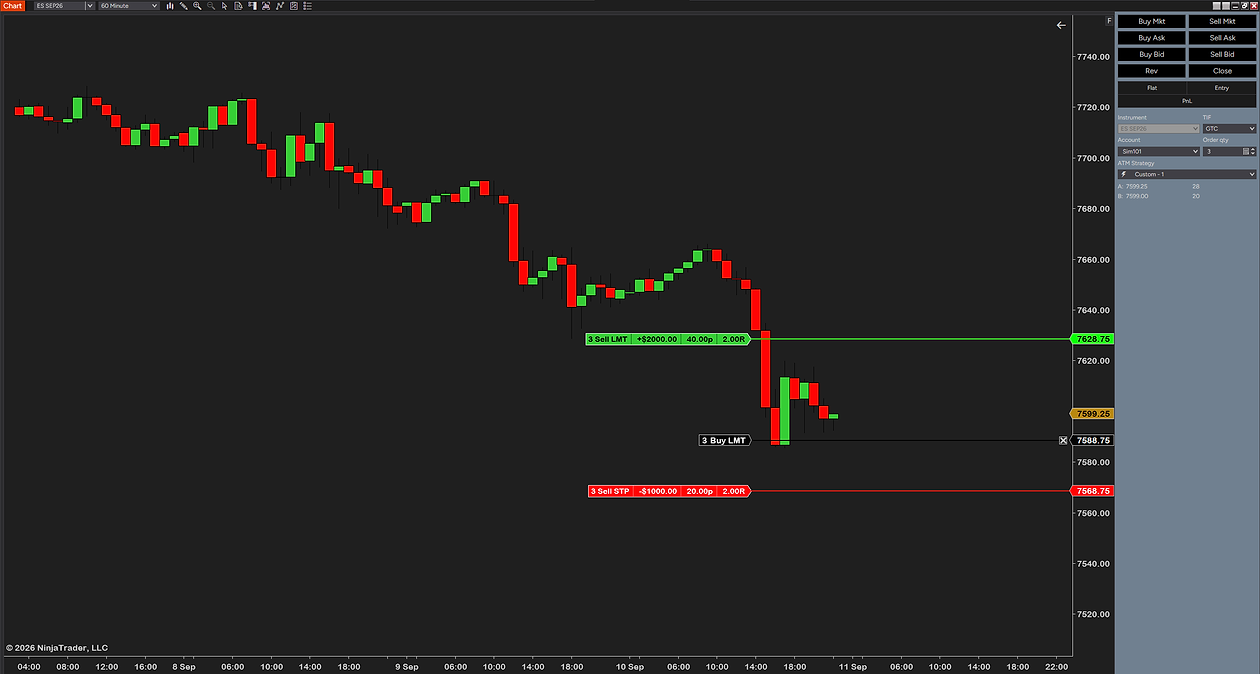
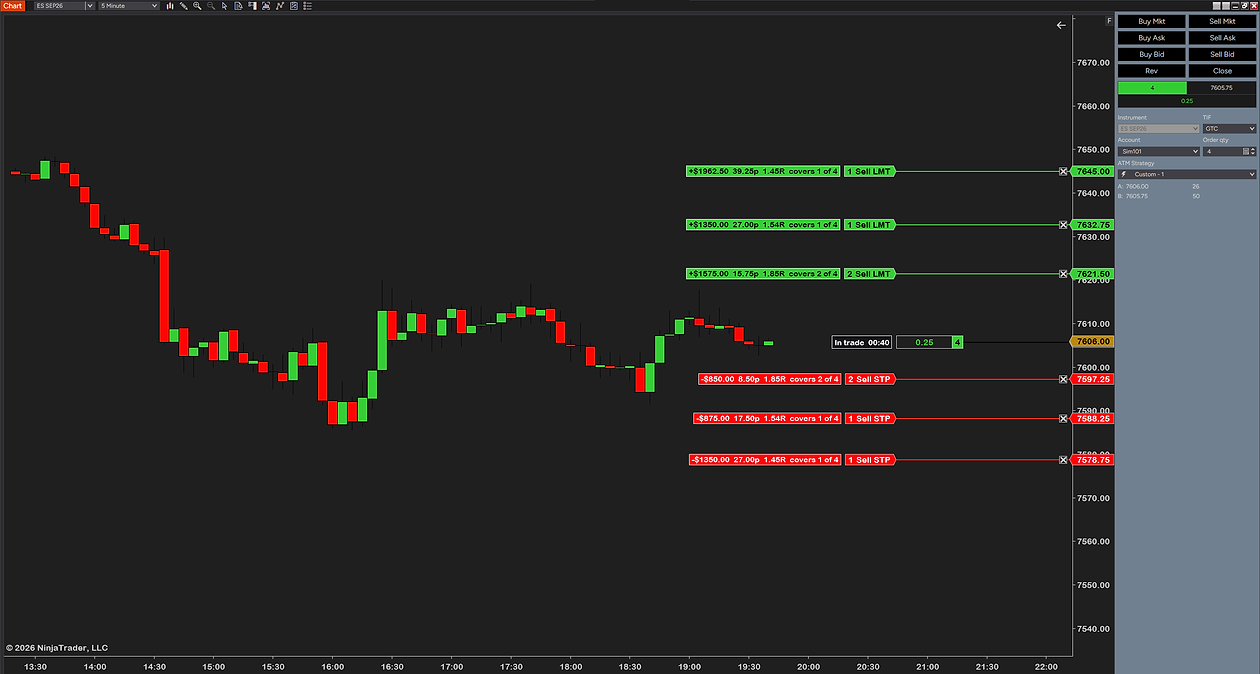
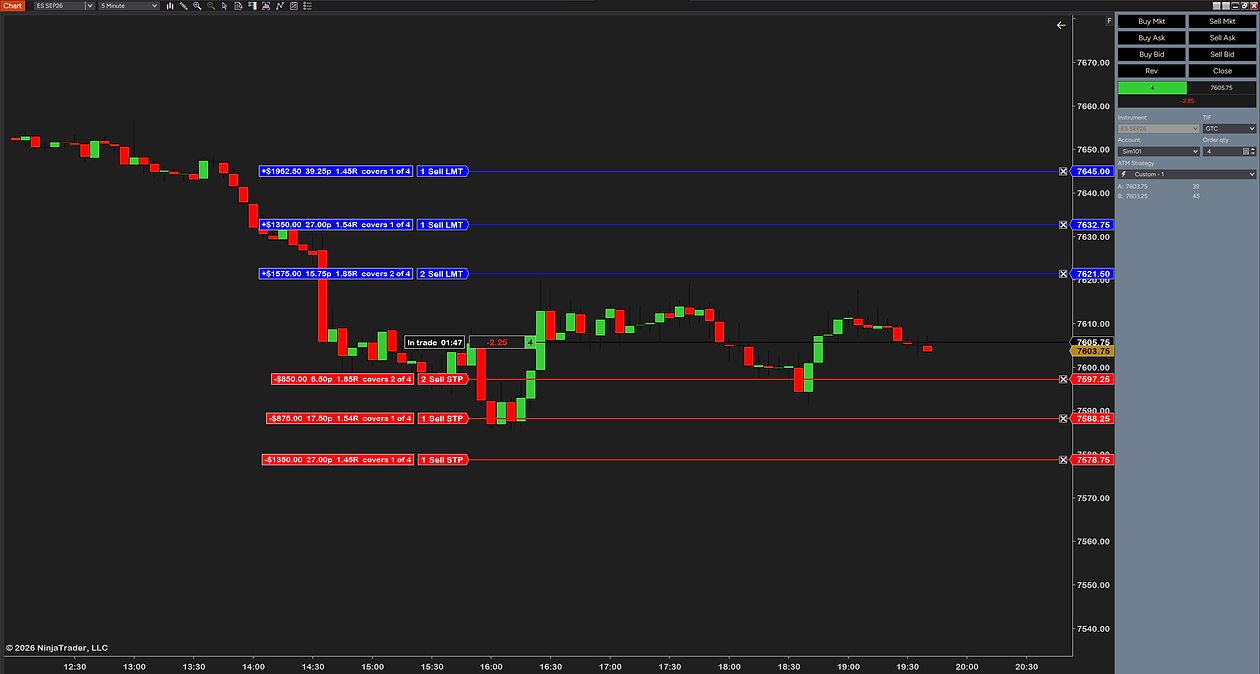
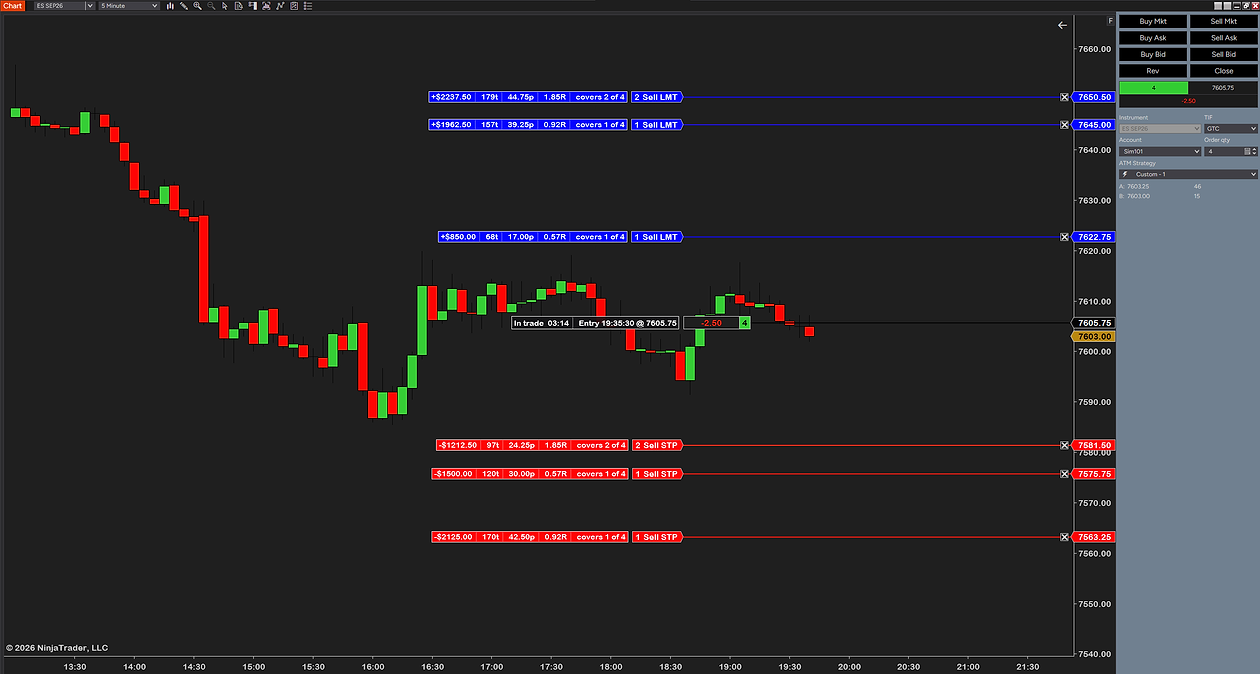
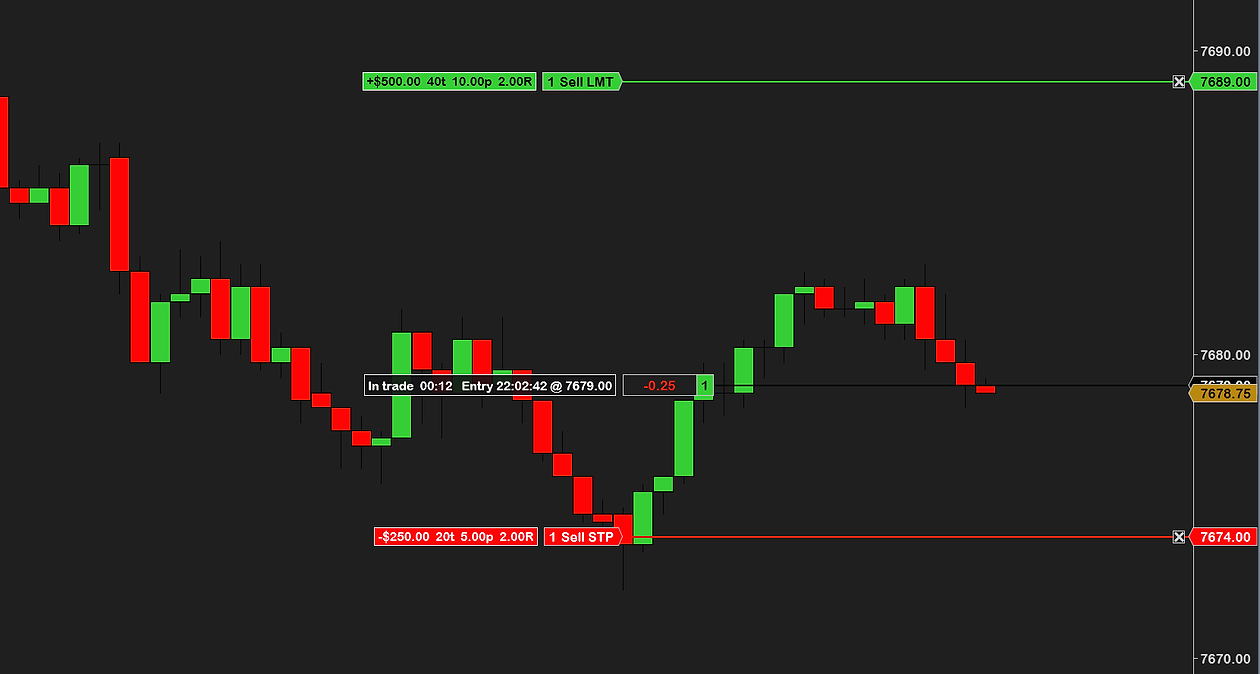
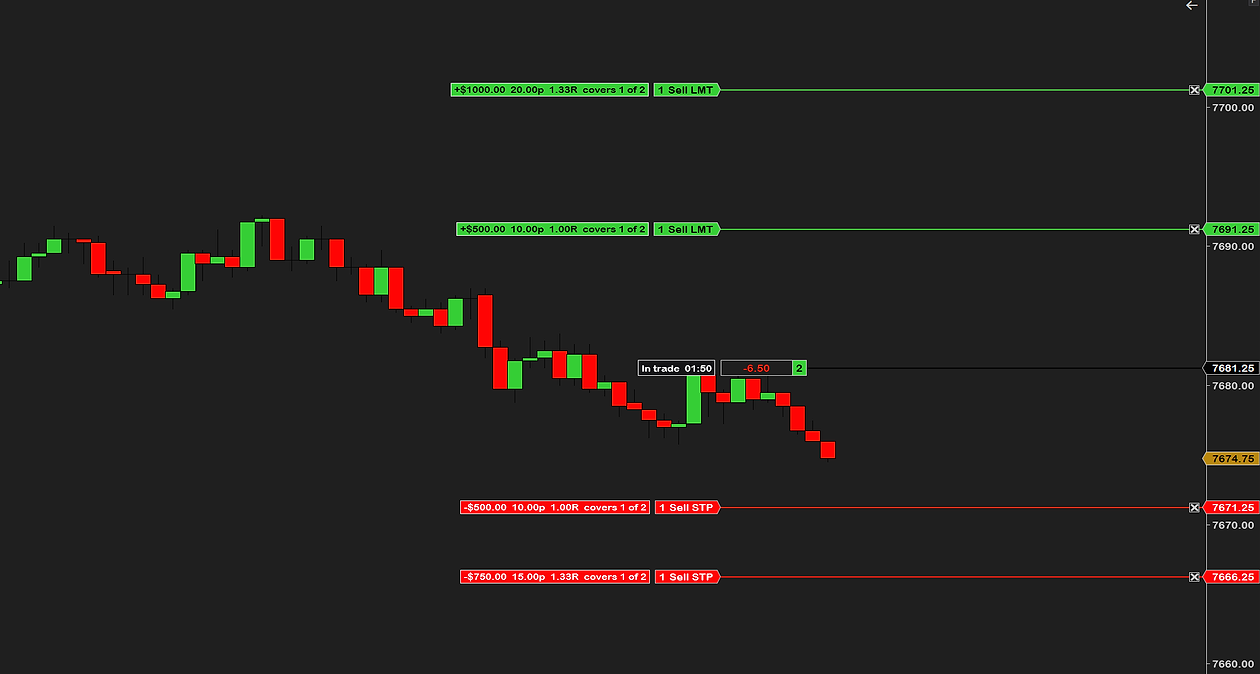
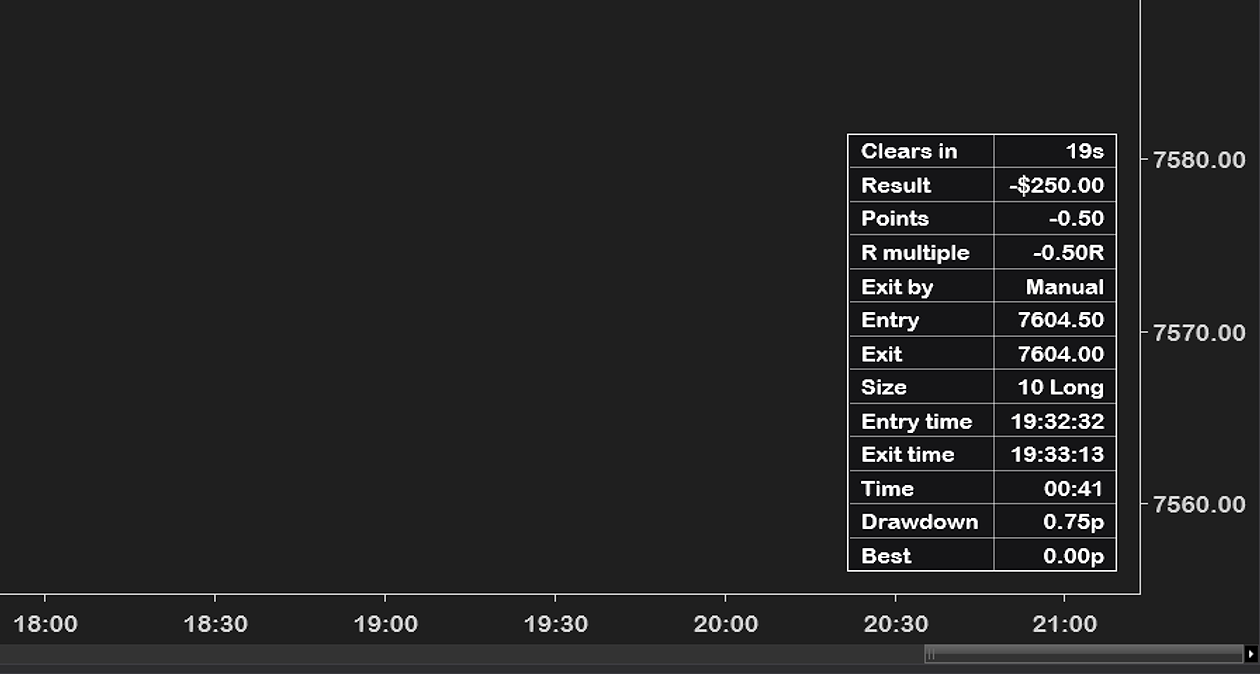
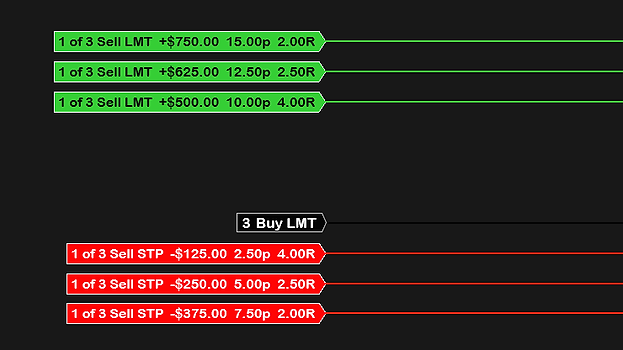
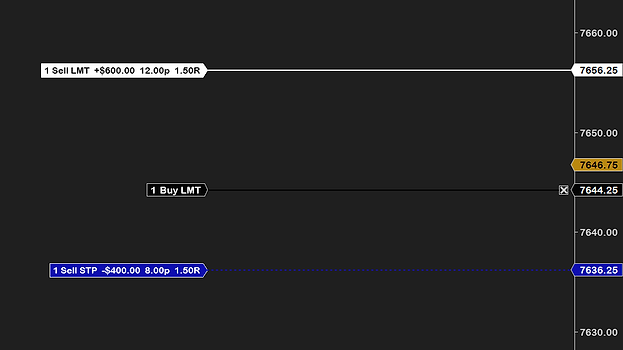
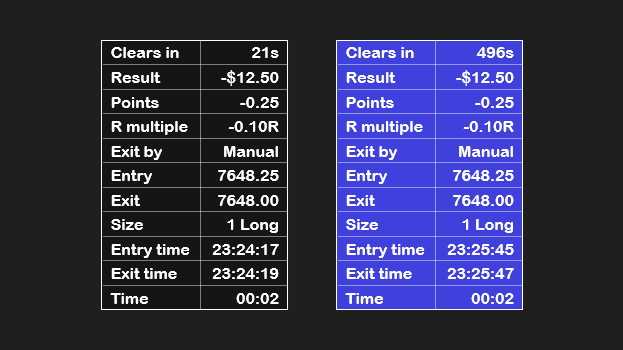
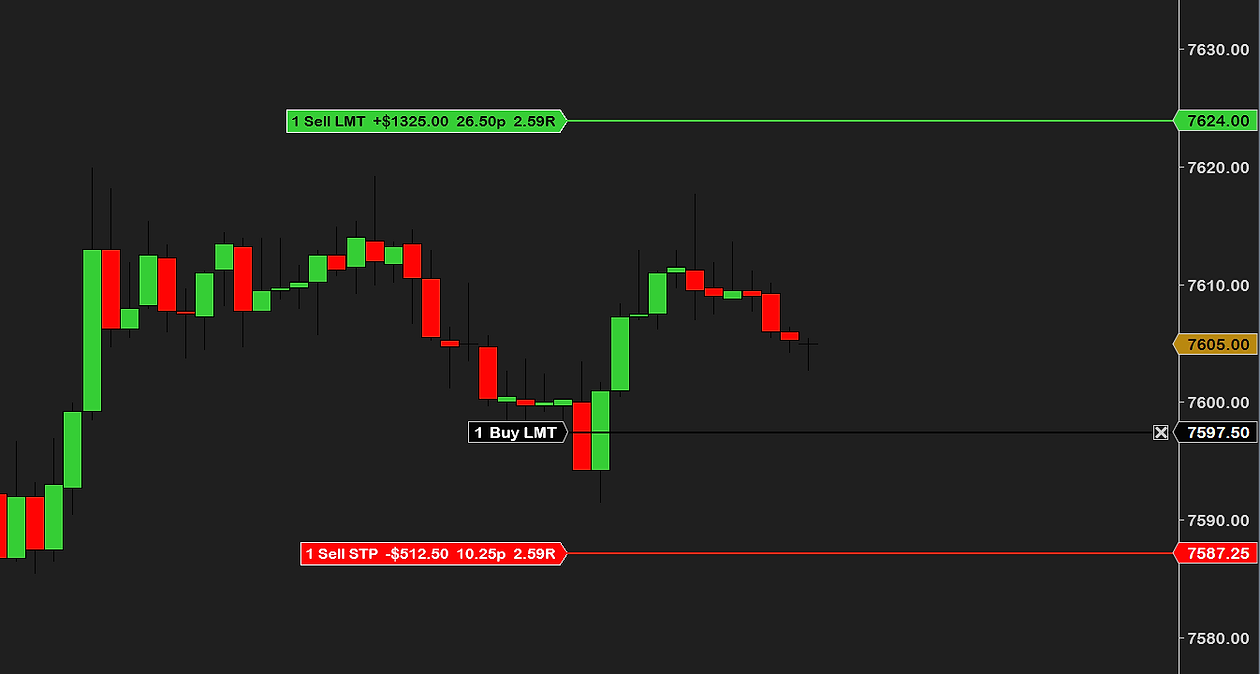
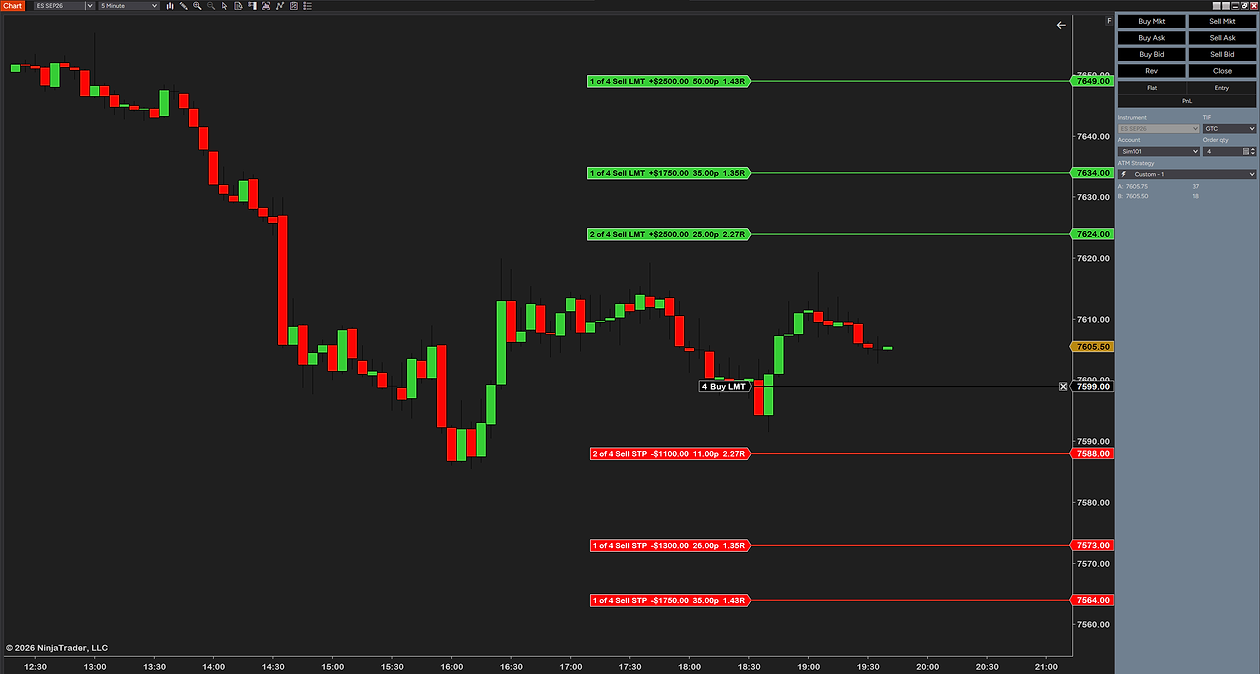
Close on a resting one-contract buy limit at 7597.50 on ES: ATM Risk Reward’ target line tagged 1 Sell LMT +$1325.00 26.50p 2.59R at 7624.00 and stop line tagged 1 Sell STP −$512.50 10.25p 2.59R at 7587.25, with the price axis A resting four-contract buy limit at 7599.00 with three target lines tagged 1 of 4 and 2 of 4 Sell LMT (+$2500, +$1750, +$2500 with points and R) and three stop lines tagged 1 of 4 and 2 of 4 Sell STP (−$1100, −$1300, −$1750), beside Chart Trader A resting one-contract sell limit at 7640.00 on a 60-minute ES chart: the stop line above tagged 1 Buy STP −$3587.50 71.75p 1.47R at 7711.75 and the target line below tagged 1 Buy LMT +$5275.00 105.50p 1.47R at 7534.50, beside Chart Trader A resting three-contract buy limit at 7588.75 on a 60-minute ES chart with the tags in the segmented style: 3 Sell LMT, +$2000.00, 40.00p, 2.00R at 7628.75 and 3 Sell STP, −$1000.00, 20.00p, 2.00R at 7568.75 In a four-contract long: the entry box reads In trade 00:40 beside NinjaTrader’s position box with an open P&L of 0.25 points and 4 contracts; NinjaTrader’s target and stop lines each carry an ATM Risk Reward tag with dollars, points, R and covers 1 of 4 or 2 of 4 The same four-contract long at 01:47 in the trade with custom colors: blue target tags and lines, red stop tags, NinjaTrader’s position box with an open P&L of −2.25 points and 4 contracts beside the entry box A four-contract long with the ticks column switched on: target tags reading dollars, ticks, points, R and covers, for example +$2237.50 179t 44.75p 1.85R covers 2 of 4, and the entry box with In trade 03:14 and Entry 19:35:30 @ 7605.75, beside NinjaTrader’s position box with an open P&L of −2.50 points and 4 contracts ATM Risk Reward in a filled long: the target line tagged +$500, 40 ticks, 10 points, 2.00R, the stop line tagged −$250, 20 ticks, 5 points, and the entry box with time in trade, entry time and entry price ATM Risk Reward on an MES chart, in a two-contract long: two target lines tagged +$500 and +$1000 with points, R and covers 1 of 2, two stop lines tagged −$500 and −$750, and the entry box showing time in trade, beside NinjaTrader’s position box with the open P&L and 2 contracts The closed-trade table after a ten-contract long: clears in 19s, result −$250.00, −0.50 points, −0.50R, exit by manual, entry 7604.50, exit 7604.00, entry and exit times, time 00:41, drawdown 0.75p, best 0.00p
1 / 10

Your stop loss and target, start to finish.

0:00 / 0:00
+$500.00 40t 10.00p 2.00R 1 Sell LMT In trade 00:12 Entry 22:02:42 @ 7679.00 -0.25 1 -$250.00 20t 5.00p 2.00R 1 Sell STP
The target tag — the profit at target in dollars, the distance in ticks and points, and the reward-to-risk of the order.
The entry box — time in trade, entry time and price; the open P&L and the contracts beside it are NinjaTrader’s own position box.
The stop tag — the dollars at risk, ticks, points and R. An impossible price draws no line and tells you why.
The target line — drawn the moment the entry is resting, in your Chart Trader color and style.
  • Before the fill and after it
  • Drag it, the ATM target moves
  • Follows the entry when you move it
  • Wrong side ignored, never guessed
NinjaTrader’s entry line — ATM Risk Reward draws beside it and never places, cancels or fires an entry.
  • Move the entry in Chart Trader
  • The whole stop and target glide with it
  • Written to your ATM, read back
  • Chart Trader stays in charge
The stop line — drawn before the entry fills and kept beside NinjaTrader’s own line after it, in your Chart Trader style.
  • Drag it before the fill
  • A refusal changes nothing
  • Own colors, opacity and gap
  • Safety mode on platform updates

Before the fill, during the trade, after the exit

Before

Before the fill: a resting buy limit at 7657.00 on MES with the target line tagged 1 Sell LMT +$55.00 44t 11.00p 1.57R at 7668.00 and the stop line tagged 1 Sell STP −$35.00 28t 7.00p 1.57R at 7650.00, beside the price axis

During

In the trade: a filled long at 7660.00 on MES with the entry box reading In trade 03:33 beside NinjaTrader’s position box with an open P&L of 0.75 points and 1 contract, NinjaTrader’s target at 7671.00 tagged +$55.00 11.00p 1.57R and stop at 7653.00 tagged −$35.00 7.00p 1.57R

After

After the trade: the closed-trade table, clears in 9s, result +$0.00, +0.00 points, +0.00R, exit by manual, entry and exit 7660.00, size 1 long, entry time 10:26:34, exit time 10:31:00, time in trade 04:26, drawdown 1.75p, best 1.00p

What ATM Risk Reward adds to Chart Trader.

Stop & target Chart Trader ATM Risk Reward
Stop and target after the fill NinjaTrader’s own lines, as always✓✓
Stop and target before the fill drawn the moment the entry is resting✓
Drag either line, the real stop or target follows written to your ATM, read back, then moved✓
Ticks, dollars, points and R on every line before the fill and after it✓
Lines follow the entry when you move it glide the entry, the stop and target glide with it✓
After the fill
Stat tags beside NinjaTrader’s lines dollars, points and R from your actual fill price✓
Entry box with the trade clock time in trade, entry time and price✓
Closed-trade table result, R, drawdown, best, duration; fades when you say✓
Correct by design
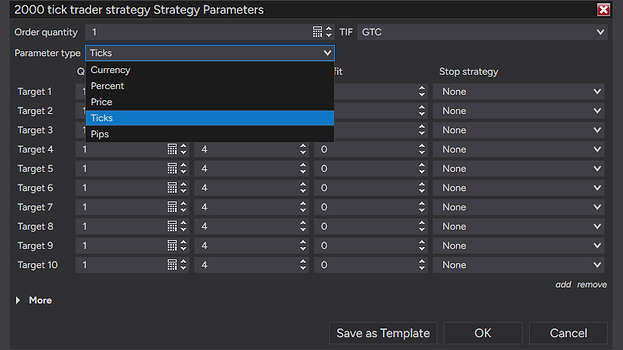
All five ATM parameter types ticks, pips, percent, currency and price, each read NinjaTrader’s way✓
Refuses rather than guesses an unverified template shows a ? and cannot be dragged✓
Price-mode check before the fill an impossible price draws no line and tells you why✓
Safety mode on a platform change display stays on, dragging stops, one plain message✓
Yours to set
Line colors and styles from your Chart Trader settings style them once, in NinjaTrader✓✓
Every box its own colors, opacity and gap gap for the stop, target and entry boxes; colors and opacity for the closed-trade table too✓
Everything adjustable 54 settings across 9 groups✓
Works on
Chart types
Tickany count
Minuteany
Volumeany size
Range, Renkoany size
Instruments
Futuresall US-dollar contracts
Stocksand ETFs
FX and CFDssome modes not draggable
Data providerany
Needs
NinjaTrader 88.1.8 or newer, free included
Chart Traderopen on the chart, required
ATM strategyselected on the entry
Machine IDnone

In short: NinjaTrader 8 with Chart Trader open and an ATM strategy on your entries. That is all ATM Risk Reward needs.

Orders placed without an ATM strategy are not shown, by design. On a chart without Chart Trader it deliberately does nothing. It never places, cancels or fires an entry order; dragging a line changes a real order at your broker, so confirm the bracket in Chart Trader before the fill.

Every setting, group by group.

ATM Risk Reward has 54 settings in nine groups, in the order of a trade: before the fill, during it, after the exit. The names in bold are the names you will see in the properties panel.

Stop loss and target lines before the fill

The moment an ATM entry rests, the stop loss and profit target are drawn where NinjaTrader will place them at the fill. Show stop line and Show target line switch each side, line and tag together; Show stop price marker and Show target price marker put the prices on the axis like NinjaTrader’s own, up to four levels per side. Each of the five ATM parameter types is read NinjaTrader’s way.

Drag the line and the real order moves

Allow dragging (on) lets you hold a stop or target line and drag it, or click its tag once to pick it up, exactly like NinjaTrader’s own orders. The drop is written into your ATM strategy in the template’s own units and read back, and only then does the line move; a refusal writes nothing. Follow entry while moving it keeps both lines gliding with the entry.

R multiple: the risk reward ratio on every tag

Show R multiple puts the reward-to-risk ratio on the pending tags: 1.5R means the target is 1.5 times the stop distance. After the fill, Tag: show R multiple measures it from your actual fill with the stop and target as they are now, so a moved stop changes the number. When the trade closes, Show result in R scores the result against the risk you took at the start.

Order lines with dollars, ticks and points

Show dollars, Show points (on, “4.25p”) and Show ticks (off) set what each pending order line’s tag reads, next to Show order (“1 Sell STP”, or “1 of 3 Sell STP” for a bracket row covering fewer contracts). Tag: show dollars, Tag: show points and Tag: show ticks make the same choice for the stat tags during the trade. Dollars per contract shows every dollar figure for one contract instead of the whole order.

The entry box and the trade clock

Show entry box draws a small box on your position line with a clock: “In trade 05:12” with Entry box: show text labels on, a bare timer with it off. Entry box: show entry time and Entry box: show entry price add the time and your average fill. Every box has its own color, text color, opacity and a gap to NinjaTrader’s boxes, measured from where NinjaTrader actually drew them.

The closed-trade table after every exit

The moment the position is flat, a table appears in the Closed trade table position corner for Show closed trade for (seconds) (30), with a countdown. Rows you switch on: the result in dollars and points, the result in R, exit by (stop, target or manual), entry and exit price and time, size and direction, duration, Show drawdown (how far it went against you) and Show best price reached.

Get ATM Risk Reward on your chart

All plans give you instant access to ATM Risk Reward, ready to use right away. No machine ID required.

14 day free trial

$0/14 days

Nothing to cancel, nothing charged.

Start free trial
Included:
  • Every setting of the paid version
  • Stop and target lines before the fill
  • Stat tags, entry box and the closed-trade table
  • No card required
  • No activation step
  • Same install as the full version

Full version, nothing to activate.

Buy now 67% off

$149$49/once

Until 30 September, then $149. Lifetime license.

Buy now
Everything in the trial, plus:
  • Yours to keep — no renewal, no expiry
  • One license — every computer you own
  • Free updates
  • Support by email — answered within a day
  • 14-day money-back guarantee
  • Instant download after checkout

Secure checkout via Creem. Price includes tax.

Monthly subscription 67% off

$14.99$4.99/mo

Start by 30 September and keep $4.99/mo for good.

Subscribe
Everything in Buy now, while subscribed:
  • One license — every computer you own
  • Free updates while subscribed
  • Support by email — answered within a day
  • Cancel any time from your account
  • Instant download after checkout

Secure checkout via Creem. Price includes tax.

How traders use it

Four moments in a trade where seeing the stop loss and target early matters. None of them is a signal; the entries, the stops and the discipline are still yours.

Before the fillThe resting-order adjust

Your limit is resting and the market shifts. Drag the stop under the new swing, or the target to the level that matters, before the fill, instead of after.

SizingThe R read

The target line says +2.0R and the stop says −$62.50 for the order before you commit. If the number is wrong for the trade, you see it while it is still free to fix.

SafetyThe price-mode catch

A Price-mode template holding a distance instead of a price would put your stop at price 10.00 and leave a filled position naked. ATM Risk Reward draws no line and tells you, before the fill.

After the tradeThe post-mortem

The closed-trade table shows the result in dollars and R, the drawdown you sat through and the best price you saw, so the numbers are still on screen when you write it up.

New to ATM strategies? Read the ATM strategy guide →

Why choose us.

61+Countries(all products)
4.8/5★Average rating(all products)

Free trial on every paid product. Full refund within 14 days. Custom changes on request. Very few NinjaTrader 8 vendors offer all three. We do it for one reason: you should never have to pay to find out whether a tool works on your chart. Most of our tools are free. The paid ones are extensively tested, kept up to date and priced well below the usual rate. We would rather earn a customer who comes back than make a sale that does not last. Questions? Email [email protected]. We answer fast.

260+Traders(all products)
700+Downloads(all products)
World map with every country running UsefulIndicators highlighted

What our customers are saying

Frequent questions.

Question or idea for improvement? Email us, we reply fast.

Download the zip after checkout, then in NinjaTrader 8 go to Tools → Import → NinjaScript Add-On and pick the file. Add ATM Risk Reward to a chart that has Chart Trader open, place an ATM entry, and the lines are there — most traders are done in under a minute. The step-by-step guide covers every message NinjaTrader can show and the update rule.

Those are exactly the orders it draws. Your ATM strategy creates a stop loss and a profit target behind the entry — NinjaTrader’s own names for what most traders call the stop and the take profit — and ATM Risk Reward puts both on the chart as order lines while the entry is still pending, with the dollars, ticks, points and R on each line. Drag either one and the real order moves. It never creates the orders itself: your ATM template and Chart Trader stay in charge. If ATM strategies are new to you, our guide to NinjaTrader risk reward tools explains where the stop loss and profit target actually come from.

It never places, cancels or fires an entry order; your workflow stays native Chart Trader. When you drag a line, ATM Risk Reward writes the new stop or target into your live ATM strategy — that is a real change to a real order at your broker, which is the whole point. Confirm the bracket in Chart Trader before the entry fills; Chart Trader is always the source of truth.

ATM Risk Reward reads your account and your orders through the Chart Trader panel on that chart — it never picks an account on its own. On a chart without Chart Trader it deliberately does nothing and says so in the Output window; open Chart Trader (the collapsed view is enough) and it starts by itself. If the panel is missing or greyed out, our Chart Trader guide covers how to enable it and what to check.

All five, each read the way NinjaTrader defines it: ticks and pips as a distance from your entry, percent as a share of the entry price, currency as the money for the whole bracket, and price as the actual level. Templates it cannot verify against a real fill — currency with several bracket rows, currency on a non-dollar instrument, pips on anything but futures — are shown with a ? and cannot be dragged. On forex, CFDs and crypto, where pip size varies, pips lines are not drawn at all.

ATM Risk Reward checks every internal surface it relies on when it loads. If an update has moved one, it switches to safety mode: the display keeps working, dragging is switched off, and one plain message tells you to check for an ATM Risk Reward update. Your orders are never affected by that; they stay exactly as NinjaTrader recorded them.

That is a refusal, and a refusal never changes your orders. The usual reasons: display-only mode is on, the entry was busy updating (try again in a second), or the drop landed on the wrong side of the entry — the preview says so while you hold it there. The full reason is always written to the NinjaScript Output window.

No, and we won’t pretend it is. It shows you the stop loss and target you have already chosen, where it will land and what it risks, and lets you move it before the fill. Which trade to take, and where the stop belongs, is still yours.

Yes. It is a tool that changes real orders, so run it on your Sim account for a session or two, drag a few stops and targets, watch Chart Trader agree, and only then trade it live. That is how it was built and tested, for weeks, before it shipped.

No. NinjaTrader’s own Risk Reward drawing tool, and the add-ons built on the same idea, draw a planned trade: you sketch the entry, stop and target and read the ratio. ATM Risk Reward draws nothing you plan. It shows the real stop loss and profit target your ATM strategy will place, on the chart while the entry is still resting, and dragging a line moves the real order. If the planning tool is what you want, our guide to NinjaTrader risk reward tools covers the built-in one and the add-ons.

Not by itself. NinjaTrader draws the stop loss and profit target lines when the entry fills; while the entry is resting, the bracket lives only in the ATM strategy’s numbers. ATM Risk Reward reads those numbers and draws both lines where they will land, tagged with dollars, points and R (ticks if you want them), so you see the whole bracket before you are in the trade and can move it while it is still free to fix.

Yes, three ways. Before the fill, the R multiple on the tags is the target distance divided by the stop distance: 2.00R means the target is twice as far as the stop. During the trade, the tags measure R from your actual fill price with the stop and target as they are now, so a stop moved to breakeven changes the number. After the exit, the closed-trade table scores the result against the risk you took at the start, for example +1.80R.

Yes. Every stop and every target in the template is its own line with its own tag, and a bracket row that covers fewer contracts than the order reads “1 of 3 Sell STP” with the dollars for that row. The price markers on the axis show up to four levels per side. One limit: a Currency template with several bracket rows is shown with a ? and cannot be dragged, because its conversion is not fill-verified.

Email support, answered by the traders who built it. If something looks wrong, switch on Diagnostics, trade briefly on Sim and send us the log it writes — it stays on your computer until you choose to send it. Bugs get fixed, and updates are free.

The Nerd Vault

What the lines are, what a drag writes, and the rules that keep it honest with your orders.
How it’s calculated
Line = entry ± the template’s value

The moment an ATM entry is resting on the chart’s account and instrument, ATM Risk Reward reads its ATM strategy and draws the stop loss and target where NinjaTrader will put them at the fill. Each of the five parameter types is read NinjaTrader’s way: ticks and pips as a distance, percent as a share of the entry price, currency as the money for the whole bracket, price as the level itself.

Drag = write, read back, then move

A drop converts the price under the mouse into the template’s own units, writes it into the live ATM strategy, and reads the bracket back. The line moves only when the read-back matches. A refusal — wrong side of the entry, an order mid-update, an unverified template — snaps the line back and writes nothing.

R = reward ÷ risk  from the real fill after it fills

Before the fill, R is the target distance over the stop distance. After it, every tag is measured from your actual fill price, and the closed-trade result is scored against the risk you started the trade with, not the stop you trailed it to.

Hover a term to see it in the drawing and the table
TargetStopEntryWrittenline colors are your Chart Trader’s
ONE TRADE, FOUR STAGES · MES, 1 LOT, LONG PLACED → DRAGGED → FILLED → CLOSED · THE ENTRY IS NINJATRADER’S THROUGHOUT PLACEDDRAGGEDFILLEDCLOSED 7542.757541.757540.75 TARGET 4t +$5STOP 4t -$51 Buy LMT 7541.75 written: StopLoss = 6read back: 6 · line movesTARGET 4t +$5 · 0.7R +$5.00 · 4t · 0.7R-$7.50 · 6t · 1Rfilled 7541.75 · 00:41 Result +$5.00R +0.67RExit by TargetEntry 7541.75Exit 7542.75Drawdown -$2.50Best +$5.00Time 3m 12s OUR LINES RETIRE AT THE FIRST FILL · NINJATRADER’S OWN LINES TAKE OVER · OUR TAGS RIDE THEM MES: 1 TICK = $1.25 · 4 TICKS = $5.00 · R AFTER THE DRAG = 4 ÷ 6 = 0.67 · DRAWDOWN 2 TICKS = $2.50 One trade, drawn to the worked example below. An illustration with a compressed time axis, not market data. Line colors on your chart are your Chart Trader’s own.
Worked example · one stop, five parameter types, MES long from 7541.75, 1 lotTick 0.25 · $1.25 per tick · $5 per point
TypeTemplate saysNinjaTrader meansStop lands atTicksRisk, 1 lotDraggable
Ticks2020 ticks below the entry7536.7520$25.00yes
Pips20on futures a pip is a tick7536.7520$25.00yes (futures)
Percent0.200.20% of 7541.75 = 15.08 pts, nearest tick7526.7560$75.00yes
Currency50$50 for the whole bracket, ÷ contracts7531.7540$50.00yes (single row)
Price7530.00the stop’s actual price level7530.0047$58.75yes
Price10a stop AT price 10.00 — the exchange rejects itno line—warningfix it first

Every conversion is written back in the template’s own units, so a drag on a Percent template writes a percent and a drag on a Currency template writes dollars; NinjaTrader then does exactly what it would have done had you typed the number. Currency with several bracket rows, Currency on a non-dollar instrument, and Pips on anything but futures are shown with a ? and never written: their conversions are not fill-verified. On forex, CFDs and crypto, where pip size varies, Pips lines are not drawn at all.

Never places an entry

Every entry is placed, moved and canceled by you, in Chart Trader. ATM Risk Reward reads the account Chart Trader has selected and never picks one itself; it touches nothing but the stop and target values of the bracket you drag. There is no order button in it, and there never will be one.

Write, then read back

The line moves only after NinjaTrader confirms the value it holds. The order state is re-checked immediately before every single write, so a fill arriving during a drag closes the window as far as the platform allows. Nothing is ever written on the strength of where the mouse is.

Measured, not predicted

After the fill our tags sit beside NinjaTrader’s own order boxes. Their width is measured in your chart’s font every frame, and the position row is read from where NinjaTrader actually draws it, so the spacing holds across charts, monitors, DPI and font sizes. The three gap settings are for taste, not calibration.

Safety mode

ATM Risk Reward relies on NinjaTrader surfaces that an update could change. Every one is verified at load; if any has moved, the display keeps working, dragging is switched off and one plain message asks you to check for an update. The failure is visible and it is safe: display on, dragging off.

This is the actual settings panel in NinjaTrader — it follows the life of a trade: before the fill, during, after — with plain-English names and no cryptic abbreviations. Every row in the table below is one of these. Line colors, thickness and style are not here on purpose: they follow your Chart Trader Lines settings, so the pending bracket looks exactly like the lines NinjaTrader draws at the fill.

SettingDefaultRange
General
Allow draggingOnOn · Off
Follow entry while moving itOnOn · Off
Dollars per contractOffOn · Off
Display
Show stop lineOnOn · Off
Show target lineOnOn · Off
Show stats after fillOnOn · Off
Show stop price markerOnOn · Off
Show target price markerOnOn · Off
Show entry boxOnOn · Off
Show separator linesOffOn · Off
Before Trade Info
Show orderOnOn · Off
Show dollarsOnOn · Off
Show pointsOnOn · Off
Show R multipleOnOn · Off
Show ticksOffOn · Off
During Trade Info
Tag: show dollarsOnOn · Off
Tag: show pointsOnOn · Off
Tag: show R multipleOnOn · Off
Tag: show ticksOffOn · Off
Entry box: show entry timeOffOn · Off
Entry box: show entry priceOffOn · Off
Entry box: show text labelsOnOn · Off
Closed Trade Info
Show trade resultOnOn · Off
Show result in ROnOn · Off
Show exit byOnOn · Off
Show entry priceOnOn · Off
Show exit priceOnOn · Off
Show size and directionOnOn · Off
Show trade durationOnOn · Off
Show entry timeOnOn · Off
Show exit timeOnOn · Off
Show drawdownOnOn · Off
Show best price reachedOnOn · Off
Show disappear countdownOnOn · Off
Show closed trade for (seconds)300 – 600
Closed trade table positionBottom RightBottom Right · Bottom Left · Top Right · Top Left
Box color#0F0F12 at 90%Any color
Text colorWhiteAny color
Box opacity (%)1000 – 100
Stop Box Visuals
Use custom colorsOffOn · Off
Box colorRedAny color
Text colorWhiteAny color
Box opacity (%)1000 – 100
Box gap (pixels)90 – 1000
Target Box Visuals
Use custom colorsOffOn · Off
Box colorLime GreenAny color
Text colorBlackAny color
Box opacity (%)1000 – 100
Box gap (pixels)90 – 1000
Entry Box Visuals
Box color#0F0F12 at 90%Any color
Text colorWhiteAny color
Box opacity (%)1000 – 100
Box gap (pixels)90 – 1000
Diagnostics
Enable diagnosticsOffOn · Off

Ranges are printed only where the indicator enforces one. Colors accept any color.

There is no bar logic at all: ATM Risk Reward is driven by order events, so it costs the same on a tick chart as on a daily one and works on every bar type by construction. Text layouts and measured widths are cached until the font or the text changes; the draw pass runs only when something on screen can have changed, with an idle gate when nothing is happening. It keeps running with the chart tab in the background, because a resting order does not care which tab you are looking at. If your chart ever lags with ATM Risk Reward on, that is a bug and we want to hear about it.

A drop writes the stop or target of that order’s ATM strategy, in the units the template uses, and affects that order only: the template you saved is untouched. Currency is written as the money for the whole bracket, the way NinjaTrader reads it, so a two-lot order and a one-lot order at the same dollar risk land at different distances, exactly as they would from the template. One honest limit: a fill landing in the same instant as a write can, in principle, let one last change through; the order state is re-checked immediately before every write to make that window as small as the platform allows. Confirm the bracket in Chart Trader before the fill.

The file
ATMRiskReward_v1.2.zip, 250 KB. A standard NinjaScript add-on: Tools → Import in NinjaTrader 8, nothing else to install. Delivered instantly on the checkout page and in your email receipt.
The license
One-time purchase, yours to keep. No machine ID and no activation step: install it on every computer you own.
Updates
Every update is free and installs the same way, over the top of the old one.
Support
Email, answered by the traders who built it. Bugs get fixed. A step-by-step installation guide and the support page are there if you ever need them.
Platform
NinjaTrader 8.1.8 or newer (verified on 8.1.8.2), the free tier included. Chart Trader open on the chart (collapsed is fine) — without it ATM Risk Reward deliberately does nothing and keeps checking. One license, every computer you own.
ATM only
A stop loss or profit target placed without an ATM strategy is not shown. Manual exits placed with ATM Strategy set to None are not counted in the closed-trade table; the Size row always shows what was counted.
Not draggable
Currency templates with several bracket rows, Currency on non-dollar instruments, and Pips on anything but futures show a ? and cannot be dragged: their conversions are not fill-verified. On forex, CFDs and crypto, where pip size varies, Pips lines are not drawn at all.
Price mode
NinjaTrader reads a Price-mode value as the actual price level. A distance typed there puts your stop loss at, say, price 10.00, the exchange rejects it, and the filled position has no protection. ATM Risk Reward draws no line for an impossible or wrong-side price and tells you, before the fill. If you want distances, use Ticks.
Partial fills
The moment any contract fills, the pending lines hand off to NinjaTrader’s own display and the stat tags carry on from there.
NinjaTrader restarts
If NinjaTrader is restarted while an entry is working, NinjaTrader discards the ATM strategy but keeps the entry order: it would fill with no stop and no target. ATM Risk Reward shows that order without bracket lines — treat it as the warning it is. Closing NinjaTrader mid-trade also drops the trade record (clock, initial risk, banked partial exits); settings changes, workspace reloads and reconnects keep it.
Scale-ins and outages
Adding contracts at a new price, or a data-feed gap during the trade, hides the Drawdown and Best rows for that trade: those two numbers can no longer be stated as whole-trade truth. The dollar result stays exact. Reverse (Rev) trades restart the clock; the reversed-out trade’s result is not shown.
Instances
One ATM Risk Reward per chart. Two draw everything twice; order safety is unaffected. On a continuous-contract chart with two live expiries of the same future, the closed-trade table cannot attribute fills between the legs.
ATM Risk Reward makes no network connection of any kind. Nothing about you, your account, your orders or your trades is sent anywhere, and there is no telemetry. The optional diagnostics log, for support, is written to your own NinjaTrader folder; it contains your account name, order ids, prices and quantities, and it leaves your computer only if you choose to email it to us.

Verification
Runs on
NinjaTrader 8.1.8.2.
Last checked
4 Sep 2026, on our own live charts. The date changes only when the indicator has actually been run on that version.
Current build
v1.2, released 7 Sep 2026. Every update is free.
Changelog
v1.2 · 20 Sep 2026
Renamed to ATM Risk Reward. The tool is unchanged — same code, same licence, same chart behaviour. If you already own it, your licence carries over automatically; after updating you will see the new name in your indicator list.
v1.1 · 15 Sep 2026
While you drag NinjaTrader's own stop or target box during a live trade, the stat tag now rides along and shows the dollars, points and R for the price under your mouse, measured from your real fill.
v1.0 · 7 Sep 2026
Initial release: pending-bracket stop and target lines with drag, all five ATM parameter types read NinjaTrader's way, pre-fill price-mode validation, post-fill stat tags measured from the real fill, entry box with the trade clock, closed-trade table, safety mode on a platform change.

Try it on Sim before you decide.

Fourteen days, every setting, no card. Run it on your Sim account first, as we did for weeks; if it stays, it is $49 once and yours to keep.

Not for you if you trade without ATM strategies or without Chart Trader: ATM Risk Reward reads both and does nothing on a chart without them. And it will never place an entry for you.

Pairs well with Key levels indicator (Intraday Reference Levels) · ProVWAP VWAP indicator · Free initial balance indicator (Live IB Range)